
Channels
The master channel list subscribers actually see — name, number, group, genre, logo, EPG ID, stream URL(s) and per-channel toggles. This is where content gets into BGPVR, either by importing a provider M3U or by mapping scanned DVB services one at a time.
On this page
- Add one channel by hand
- Import a provider playlist
- Point a channel at a DVB service and add failover URLs
- Number and order the list
- Get a logo on every channel
- Fix a channel with no or wrong guide data
- Show the SD / HD / FHD / 4K versions of a channel as one (2.9.393)
- See and join the versions of a channel in the Channels list (2.9.394)
- Back to the preferred version by itself; the group's name on its row (2.9.395)
- Logos from the BGPVR library (2.9.403)
- Keep a channel out of All channels packages (2.9.444)
- See the Timeshift mode of every channel (2.9.451, 2.9.498)
- Time-shift keeps every sound track (2.9.459)
- Apple TV live streams (2.9.461)
- Apple TV catch-up (2.9.462)
- Catch-up links on every buffer (2.9.465)
- Apps and install links for subscribers (2.9.466)
- BGPVR Player for Apple TV (2.9.496)
- The bgpvr.com audit (2.9.467)
- Fixes and clearer pages (2.9.469)
- Make a channel play only in BGPVR Player (2.9.489)
- Channel logos are always kept as PNG (2.9.490)
- The Player only column in the Channels list (2.9.506)
- Watch out
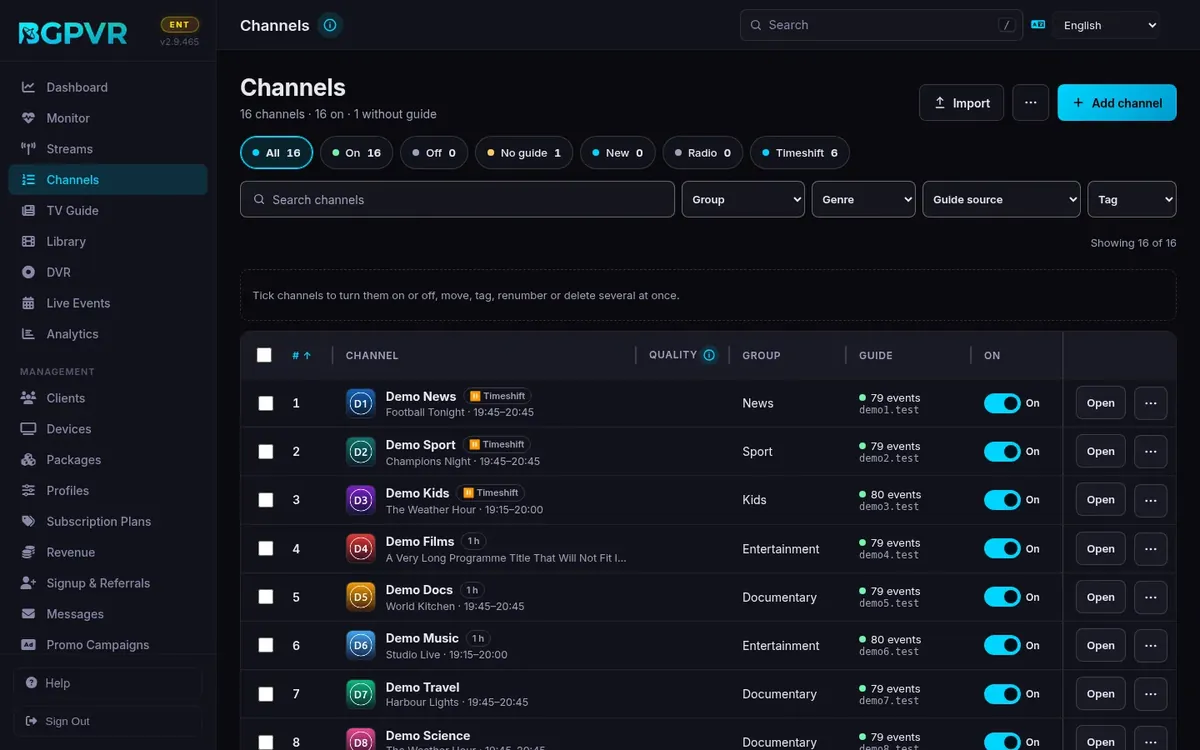
Add one channel by hand
Header → "Add Channel". Channel Name and Stream URL are mandatory; leave Number blank ("auto") and it becomes the highest existing channel number + 1. Leave Logo URL blank to let the automatic logo chain pick one (Settings → Channel Logo Automation). Optional per-channel Timeshift dropdown: Default (global setting) / Off / On-demand / Always-on. This dialog has no DVB service picker — type dvb://<Service Name> by hand, or add the channel and set it in the editor. Note: the Add dialog does NOT auto-assign an OTA EPG ID from a blank field — that only happens when you save the channel editor (see the EPG task).
Import a provider playlist
Header → "Import M3U" → Playlist Name + M3U URL → "Import". The success toast reads "Import complete" plus a logo summary ("logos N applied, M still on placeholder") — the English string has no added/skipped counts, so check the channel count in the toolbar to see what landed. Duplicate detection is by stream URL within that one source record only.
Point a channel at a DVB service and add failover URLs
Row → pencil (Edit). Under "Stream URLs" the first row is Primary; the satellite-dish button on any row opens a searchable list of scanned DVB services and inserts dvb://<Service Name>. "Add Fallback" adds Fallback 1, 2 … tried in order when the primary fails to open. The up-arrow reorders fallbacks among themselves (it is disabled on Fallback 1 — nothing can be promoted above Primary); × removes a row. Mixed http:// and dvb:// rows are allowed.
Number and order the list
Ad-hoc: double-click the # cell to type a number inline. Or tick channels — the "Number Ops" menu only appears once something is selected — then Assign Numbers… (start + step, applied in current-number order), Swap Numbers (exactly 2 selected), Number Up (+1), Number Down (−1). Wholesale: header → "Auto-Sort" shows a From → To diff (first 500 rows) before you press "Apply Sort". The rules themselves live in Settings → Channel Sorting Rules (Fixed Positions + Genre Buckets, with Preview / Save / Save & Apply).
Get a logo on every channel
Per channel: Edit → folder icon opens "Browse Local Picons" pre-filled with the channel name; the magnifier searches tv-logo / picons / iptv-org online and downloads the pick into local picons. Bulk: header → "Fetch Logos" → "Start Matching" (dialog states "Only channels without existing logos will be updated"). Clearing the Logo URL field and saving re-runs automatic selection for that channel. Every logo that is uploaded or downloaded is fitted onto one transparent 220×132 canvas, centred with a margin, so all channels look the same size everywhere; JPG and WebP logos are converted to PNG first. A nightly pass catches any new file, and the originals are kept in /data/picons_original.
Fix a channel with no or wrong guide data
Use the EPG filter dropdown ("All EPG" / "OTA EPG" / "Assigned EPG" / "No OTA" / "No EPG") to isolate the problem set. The Guide column shows OTA Live, OTA Ready, Assigned (each with an event count) or a red No EPG. Double-click the EPG ID cell to edit inline — it autocompletes from imported IDs with programme counts. Edit → "EPG Fallback IDs" takes a comma-separated list tried when the primary ID has no programme data. Since 2.9.344 the panel's Guide tab → "Fallback guide IDs" suggests imported IDs as you type each entry, like "Guide ID (EPG)" above it; picking one keeps the IDs before it and adds ", " for the next. Clearing the EPG ID in the editor and saving switches a DVB channel back to Auto OTA/EIT and queues a mux probe. Header → "Prefer OTA EPG" raises every OTA source's priority to at least 100.
Show the SD / HD / FHD / 4K versions of a channel as one (2.9.393)
Channels → ⋯ → Versions: SD / HD / FHD / 4K…. Versions are found by name on every scan and import (BNT 1, BNT 1 HD, BNT 1 FHD, BNT 1 4K / UHD). Turn on "One entry in BGPVR Player, web TV and MAG": viewers see one channel with quality badges, it starts in their Preferred quality (My Account → BGPVR App; your default in Settings → App defaults), they can switch while watching (MAG: MENU → Quality; web TV: the Quality button or GREEN) and a version that does not start falls back to the next one. Then run Auto-sort once: each channel gets one number and its other versions move after the last channel. "Check these" lists channels with the same name and the same quality by name (for example two "Diema"): Join them only if they are the same channel, then set the right quality; Split keeps a version apart, Undo puts it back. "Old MAG / TH boxes play first" chooses SD or HD for MAG254-class boxes. Xtream players, M3U, Enigma2 and Kodi (HTSP) keep every version as its own channel unless you also turn on "One entry in other apps too".
See and join the versions of a channel in the Channels list (2.9.394)
With "One entry in BGPVR Player, web TV and MAG" on (Channels → ⋯ → Versions), a channel with versions is one row at its first version's number: ▸ shows its other versions under it, each with its own On switch, Open and ⋯ (the list remembers what you opened, a search finds a version inside its channel). The Quality column shows SD / HD / FHD / 4K. To make channels versions of one: tick them → Join as versions (a ticked channel brings its other versions; a name you gave one of them stays, else the lowest-numbered one's name without its quality mark), or in Versions press Add a channel… under a channel. Versions must be in one channel group: move them to one group first (the console tells you when they are not). With "One entry" off every version is its own row again.
Back to the preferred version by itself; the group's name on its row (2.9.395)
With "One entry in BGPVR Player, web TV and MAG" on (Channels → ⋯ → Versions), a viewer whose preferred version did not start watches the next one, and the web TV and the MAG portal ask the server every minute whether the preferred one works again: after two good answers in a row they go back to it with the note "Back to HD" (live stays live, MAG catch-up keeps the second; a web TV viewer who rewound is switched once back at live, so their place is never lost). They never switch while a menu is open, an ad is on screen or playback is paused, and a version that fails again within 10 minutes of going back stays off for 30 minutes. The server answers from what it already knows — the tuners, a feed that is running, a failure in the last 2 minutes — so asking never loads the stream; there is nothing to set. BGPVR Player gets it with its versions update (app 1.9.1). In the Channels list a channel with versions now shows the group's name from Versions (for example "BNT 1") on its row, whichever version holds the number; the lines under ▸ keep their own names. The tools menu (⋯ at the top of Channels) ends with "Channels & Logos settings…", which opens Settings → Channels & logos.
Logos from the BGPVR library (2.9.403)
Your licence includes the BGPVR logo library: at first start and then daily, channels with no logo get theirs from it, and the logo search in the channel editor lists library logos first (Bulgarian names too), before the public collections. Your own uploaded logo always stays; only an empty logo or one that came from the library is ever set.
Keep a channel out of All channels packages (2.9.444)
Open the channel → General → Shown to clients → Package only. An All channels package then leaves the channel out, in the lists and at playback, and only packages that list it carry it. Use it for a channel meant for one package: add the channel to that package, then switch this on. It takes effect when you save, and a new channel, an import or a package edit no longer puts it back.
See the Timeshift mode of every channel (2.9.451, 2.9.498)
The Timeshift column, right after Quality, shows what each channel really does, whether it has its own setting or follows the server default. A pause icon with "While watched" means the buffer starts when someone starts watching. A clock-with-arrow icon with "Always · 24 h" means the buffer keeps recording, and the hours are the window. A channel with no timeshift has an empty cell. Hover a cell to read the mode in words and where it comes from: "channel setting" or "server default". The chips above the list, "While watched" and "Always", count and list the channels by the same effective mode; with the server default on, "While watched" counts almost every channel. On a narrow screen (a tablet or a phone) the column is hidden together with Quality, and the channel panel's Timeshift & delivery summary on the General tab shows the same icon and words. On a laptop screen (under 1400 px) the Group column is hidden to make room; the Group filter and the channel panel still have the group.
Time-shift keeps every sound track (2.9.459)
A DVB channel's time-shift buffer now keeps every sound track the channel broadcasts, in the broadcaster's order, so a viewer who pauses or rewinds can still choose the language (in the apps, Kodi, MAG boxes and Xtream players). Before, the buffer kept only the track with the most channels: on a channel with Bulgarian MP2 and English AC-3 5.1 that was the English one. Now the first track (usually Bulgarian) plays first and the others are in the player's sound menu. DVB subtitles and teletext stay out of the buffer, as before, and channels from an HTTP source keep their buffer as it was. If a channel announces a sound track that carries nothing yet (some channels send Dolby sound only during films), that channel's buffer keeps one track until the suite restarts; the log says so. A buffer of a channel with two sound tracks needs a little more space (about 1.5 MB per minute for an MP2 track).
Apple TV live streams (2.9.461)
When the BGPVR Player for Apple TV (on the App Store since 2.9.496) opens a DVB channel, the server makes a stream shaped the way Apple TV needs it: the picture as H.264 in three sizes (the player picks one by the line speed), deinterlaced, and each sound track the channel broadcasts as its own AAC track named by its language (for example Български and English), so the viewer can change the language in the player. MP2 sound, which Apple TV cannot play, becomes AAC. On a channel with time-shift that the subscriber's package allows, the viewer can pause and rewind up to 30 minutes inside the player; at most 8 Apple TV viewers get that window at once (each takes about 2.5 GB on the data disk, never the RAM disk), the others get the usual short live window. A viewer who leaves a channel with that window without pressing Stop keeps its tuner for up to 10 minutes (a paused Apple TV may not ask for anything meanwhile); otherwise 2 minutes, as for the web TV. DVB subtitles stay burned into the picture, in the default language. Radio, the Android and iPhone apps, the web TV, MAG boxes, Kodi and Xtream players get exactly the same streams as before. The log notes the picture and sound formats of every channel an Apple TV viewer opens (no subscriber names), so you can see which channels carry two languages. An Apple TV viewer costs the graphics card the same as a web viewer: about 7 % of a Tesla P4's encoder for an HD channel, 3 % for SD.
Apple TV catch-up (2.9.462)
When a viewer of the BGPVR Player for Apple TV plays a past programme (catch-up), the server builds that part of the channel's time-shift buffer the way Apple TV needs it: the picture as H.264 in three sizes, deinterlaced, and each sound track the channel broadcasts as its own AAC track named by its language, so the viewer can change the language in the player. The build runs on the least busy graphics card (on a server with a Tesla P4 and a Quadro P1000, the idle P1000), starts playing within a few seconds and runs ahead of the viewer, faster than real time. At most 4 builds run at once; a fifth viewer is asked to try again in a moment. When a programme cannot be built (a radio channel, no graphics card free, a programme no longer in the buffer), the app shows a clear message instead of a black screen. Catch-up covers only what is still in the channel's time-shift buffer (30 minutes by default). A build is kept next to the buffer and removed with it, or after 2 hours. The Android and iPhone apps, the web TV, MAG boxes, Kodi and Xtream players get exactly the same catch-up as before. Also new: one subscriber account can hold at most 2 of the 8 Apple TV pause windows of live TV at once, so one account cannot take them all.
Catch-up links on every buffer (2.9.465)
Catch-up links (Xtream timeshift.php and the /timeshift/ path form, which the Kodi add-on, the web TV and the apps use) play the past programme again. Since the time-shift buffer was written by the server's own recorder, these links answered "No catch-up recorded for this time window" for every channel: the recorder writes each segment's time after its length, and the link read only the other order. Both orders work now, and a segment the buffer lists twice is played once. MAG boxes were not affected (their archive reads the files). Also in 2.9.465: Apple TV catch-up and live streams pass Apple's own HLS validator (the same segment addresses on every refresh, and CLOSED-CAPTIONS=NONE), and each Apple TV signed in on its own device gets its own live session, so Stop on one never stops another (two such Apple TVs now count as two connections).
Apps and install links for subscribers (2.9.466)
My Account › BGPVR App › Get the app now lists every device your subscribers may have: Android (Google Play and the direct download, which is always the newest), Fire TV, the web player, BGPVR Player for Linux (the Snap Store button, apt.bgpvr.com, .deb and AppImage), Kodi (the BGPVR add-ons from k.bgpvr.com, sign-in with a QR code from the phone), iPhone and iPad (waiting for Apple's review), Apple TV (Coming soon until it appears in the Bulgarian App Store, as soon as the EU trader verification with Apple is complete), LG (in LG's review) and Samsung (on hold). Each card has a How to install (or How to watch) link to its topic in the subscriber help, and the Other apps cards (Xtream, M3U, MAG, Enigma2) link their help topics too.
BGPVR Player for Apple TV (2.9.496)
Nothing to set up. BGPVR Player for Apple TV is on the App Store (Apple TV HD and Apple TV 4K with tvOS 17 or newer): live TV, the guide, catch-up, recordings, films and series, with profiles and Kids. A viewer searches the App Store for BGPVR Player and signs in with the phone (the QR code or the 8-letter code on the TV, as on the other TV apps) or with username and password. My Account › BGPVR App › Get the app shows the Apple TV card as Coming soon until the app appears in the Bulgarian App Store, as soon as the EU trader verification with Apple is complete, and the subscriber help has an Apple TV topic. Under App Store rules adult channels and films are not shown in the Apple TV app. An Apple TV shows as Apple TV in Devices. The iPhone and iPad app is still waiting for Apple's approval. Also in 2.9.496: BGPVR Player for Linux is no longer a beta; the Snap Store line is sudo snap install bgpvr-player.
The bgpvr.com audit (2.9.467)
My Account › BGPVR App shows the Kodi card only when the account has the Xtream door (BGPVR Setup signs in through it), and the Google Play card opens the phone help. The operator guide's addresses have no ".html" any more (bgpvr.com/admin-help/recordings; old links still land), Google Cast is listed in the Pro plan, and the Bulgarian text says възел, поток and грабер. The help no longer explains a token that only the software vendor uses.
Fixes and clearer pages (2.9.469)
A live channel whose source sends its sound languages as separate tracks now starts in the web player (and on Apple devices through that source). The Dashboard is fully in Bulgarian, the Channels list and Subscription plans read on a phone, the MAG portal names the weather days in English when the portal is in English, and the EPG store sends your billing country (Settings › Billing & payments › Tax information › Country) when you buy. The guide's and the console's links use the short addresses (bgpvr.com/admin-help/channels).
Make a channel play only in BGPVR Player (2.9.489)
Switch on Modules > BGPVR Player only (every plan). In the channel's panel, General > Where it plays, tick BGPVR Player only and Save: a question first shows who would lose the channel (clients who watched it in another player, or in a BGPVR Player older than 1.9.7, in the last 30 days); tick that you understand and press Save and mark. The mark covers every version of the channel (HD, SD, the backup). A marked channel stays in every channel list; in TiviMate, VLC, Kodi, Enigma2, on a MAG box, from a copied link or with a copied login it plays a short message instead: "This channel can only be watched in BGPVR Player". BGPVR Player (Android, Android TV, Google TV, Fire TV, web TV) asks the server for a short-lived signed link for that channel and plays it (an app that is open picks a new mark up at its next start). Catch-up, timeshift and recordings of the channel follow the same rule. Two options in that module's panel, both off by default and Pro and up, change who plays a marked channel: Signed-in devices only and Also on MAG and TH boxes (see BGPVR Player only: signed-in devices and boxes (2.9.500) in Modules). One channel is marked with the Player only switch in the Channels list (see The Player only column in the Channels list (2.9.506)); to mark many at once tick them in the list and press Player only: on; the Player only chip shows the marked ones. Remove the mark (the switch, or Player only: off) and it plays everywhere again; switching the module off keeps the marks and lets every player play them. This is not DRM: it stops other players and copied links, not screen capture. Two limits in BGPVR Player 1.9.7: Light quality is not offered on a marked channel's recording (the original plays), and Live+ items made from a marked channel's recordings do not play in the app; a marked channel's recording opened before the app has loaded its channel list once shows the message, and plays when opened again.
Channel logos are always kept as PNG (2.9.490)
An uploaded or downloaded logo must be a real PNG, JPG, WebP, GIF or SVG picture of up to 2 MB; whatever it was, it is kept as a PNG. An SVG is drawn once into a PNG (one with scripts or links to the outside is refused, as before), so no logo file can carry a script; SVGs already in the library still show. A logo address must be a public http(s) address: this server, the local network and reserved addresses are refused, also after a redirect.
The Player only column in the Channels list (2.9.506)
With Modules > BGPVR Player only on, the Channels list has a Player only column right of On. Turn its switch on and the same question as in the channel's panel comes first: how many clients watched the channel outside BGPVR Player in the last 30 days, with a tick that you understand when anybody would lose it; Save and mark marks it, Keep as it is puts the switch back. Turn it off and it applies at once; the message that appears has Undo (8 seconds), which marks the channel again without a question. If the mark cannot be saved the switch goes back and the page says so. A channel that is Player only because a marked package gives it, and has no mark of its own, shows Via package and the package's name (+2 when two more marked packages give it) instead of a switch: the name opens that package, because a package's mark is changed on the Packages page. A channel that a marked package gives to some viewers while others also get it from a package that is not marked keeps its switch and shows Some viewers under it: it is Player only for the viewers who get it only from the marked package (2.9.507). To change many channels, tick them and press Player only: on or Player only: off in the bar above the list. Player only: on asks once for all of them (for example 12 channels · 41 clients would lose at least one) and saves once; Player only: off saves once and offers Undo. Channels that a marked package holds are left alone and counted in the message. Every change is one line in the module's activity list (Modules > BGPVR Player only). From 1280 px the column takes the Group column's place (the Group filter and the channel panel still have the group); with the Timeshift column too it needs 1400 px. On a narrower screen the column is hidden and each row's ⋯ menu has Player only: on or off instead (Via package opens the package). With the module off there is no column. The Player only chip is unchanged.
Watch out
- A successful "Import M3U" silently runs a full auto-sort afterwards — every channel in the system is renumbered, not just the imported ones. Do the import before you hand-tune numbers, never after.
- Import dedupe is scoped to the source record. Adding the same playlist URL a second time creates a NEW source with an empty dedupe set, so you get a complete second copy of every channel (names get " (2)" appended). There is no screen in the console that lists, refreshes or deletes an existing M3U source — the /api/channels/sources, refresh-m3u and delete endpoints exist but nothing in the UI calls them.
- The "Auto-refresh every N hours" checkbox in the Import M3U dialog is stored in m3u_sources but no scheduler reads it. Channel M3U imports are one-shot. (EPG sources are different — those really do auto-refresh.)
- Deleting a channel cascades: pending/scheduled timers are cancelled, auto-record rules are disabled, tag assignments are dropped, and the mapped flag on the DVB service is cleared so it can be re-mapped. The confirm dialog shows the timer/autorec counts first — read it.
- Channel count is licence-limited (Free 100, Pro 500, Business 1000, Enterprise effectively unlimited). An import that would cross the limit is rejected in full with 403 before anything is written — nothing is partially imported.
- Nothing enforces unique channel numbers. Assign Numbers…, Number Up/Down and inline edits can silently collide with numbers already used by other channels; only Auto-Sort renumbers the whole list consistently.
- Fallback URLs are only tried at connect time. If the primary opens and then dies mid-stream, the viewer is not moved to a fallback — they have to re-tune.
- "Advanced Stream Filters (PID Overrides)" are read only by the native DVB engine. They do nothing for proxied HTTP or HLS channels (the dialog says so, and stream_filters is referenced nowhere else in the backend).
- The per-channel Timeshift dropdown is licence-gated: saving On-demand or Always-on on Free returns 403 (require_feature('timeshift'), Pro and up).
- "AI Genre" and "Resolve Names" never change anything on their own. AI Genre runs a background sweep against the local AI service and stores a per-channel suggestion chip you click to accept; a second overlapping sweep is refused with 409. "Resolve Names" batch-probes logo-match evidence and only proposes names.
- A genre you set by hand is sticky (shown with a trailing • in the dropdown) and survives Auto-Sort; picking "↺ Auto" clears the manual flag and lets the server re-infer immediately.
- "Detect Radio" previews first and only ever moves channels INTO Radio (0 → 1); it never un-flags one you set yourself. Radio channels stream audio-only, which is what makes them play on iPhone/iPad.
- Deleting a tag in "Manage Tags" also deletes every assignment of that tag on every channel.
- "HLS for MAG boxes" is a per-channel remux (not a transcode) for set-top boxes whose TCP receive window is too small for a heavy channel. It costs extra zap time — leave it off unless that specific channel actually cuts.
- The playlist-URL guard on the Stream URL field only fires when the URL path ends in .m3u/.m3u8 and the probe fetch succeeds. Provider links like .../get.php?username=… are not detected and will be saved as a normal stream URL.
- Channels whose stream URL is an HLS (.m3u8) playlist are fetched through this server. Viewers get short-lived (5-minute) links tied to the channel, never the provider's address or login; old player URLs that carry url= now get 410 Gone. Relay streams set to "Redirect to source" are not covered — see Streams.
- The Guide column (what is on now and which EPG source is in use) can be up to a minute old, and up to 30 minutes while the server's disk is very busy, so the page never waits for the guide. Names, numbers, groups and settings are always current, and a change you save shows at once. Right after a restart the Guide column can stay empty for a few seconds; the page fills it in by itself while it is open.
- "Pornographic content" in the channel dialog (Automatic (keyword) / Porn / Not porn) marks a channel as adult for the BGPVR Player app and for protection of minors (Settings → Clients). Only an admin can change it; staff see it greyed out. The server records every change and who made it. Under App Store rules the iPhone / iPad app (BGPVR Player 1.8.5 build 2353 and later, now in review at Apple) never shows adult channels or films at all, whatever the switches; every other device and app is unchanged.
- Since 2.9.325 a porn keyword (Settings → Clients → "Protection of minors" → "Porn keywords (name, group, title)") counts only where a word starts: "xxx" no longer marks "MCMLXXXIX", while "porn" still marks "Porno" and "еротик" still marks "Еротика". A keyword that starts with a symbol counts anywhere ("+18" in "Kino+18 HD"); one that starts with a digit counts unless a digit is right before it ("18+" in "Club18+", not in "Канал118+"). The web TV's Kids profiles, the MAG portal's locked words and BGPVR Player 1.8.4 use the same rule. A channel that matched only inside a word is no longer adult on "Automatic (keyword)" and is no longer suggested for review: if it really is adult, set it to "Porn" in its dialog.
- Versions (2.9.393): turning "One entry" on changes no numbers by itself — until you run Auto-sort a channel shows at its first version's number, so the list may have gaps. Since 2.9.395 a version that does not start is no longer skipped for 6 hours: the web TV and the MAG portal go back to it by themselves once the server says it works. BGPVR Player shows the one entry from app 1.8.10; older apps keep showing every version.