
Tuners
DVB inventory and scanning: adapter registration and per-adapter configuration, DVB networks, their muxes, discovered services, and mapping those services into channels. Admin-only nav item.
On this page
Tuners, scanning & EPG
Tuners
- Tuners → Discover adapters finds anything passed through
/dev/dvb - Select a network preset, or run a blind scan if your provider is not listed
- Map discovered services to channels
A weekly automatic rescan runs by default (every 168 hours) and maps only newly found services, producing a diff report rather than overwriting your work.
EPG
Two source types under EPG Manager → Sources:
- XMLTV — a URL, imported immediately. Scheduled refreshes run in the night-time quiet window (02:00–06:00 by default, Settings → AI Processing → AI render queue; Business licence, on lower tiers the default window applies) unless the source is more than 36 hours old
- OTA — programme data broadcast by the DVB stream itself; add the source, then trigger a scan
EPG grabbers are Pro and up: ready-made grabbers for Bulgarian and other European listings are sold in the Grabber Store (EPG Manager → Grabbers); none ship inside the image. Your own XMLTV and OTA sources work on every plan. When an OTA source and an XMLTV source both have current data for a channel, OTA wins; priority only decides between sources of the same kind.
An unlocked tuner reports AGC noise, which can look like a healthy signal. Always check the lock indicator, not the percentage.
In the console: Tuners
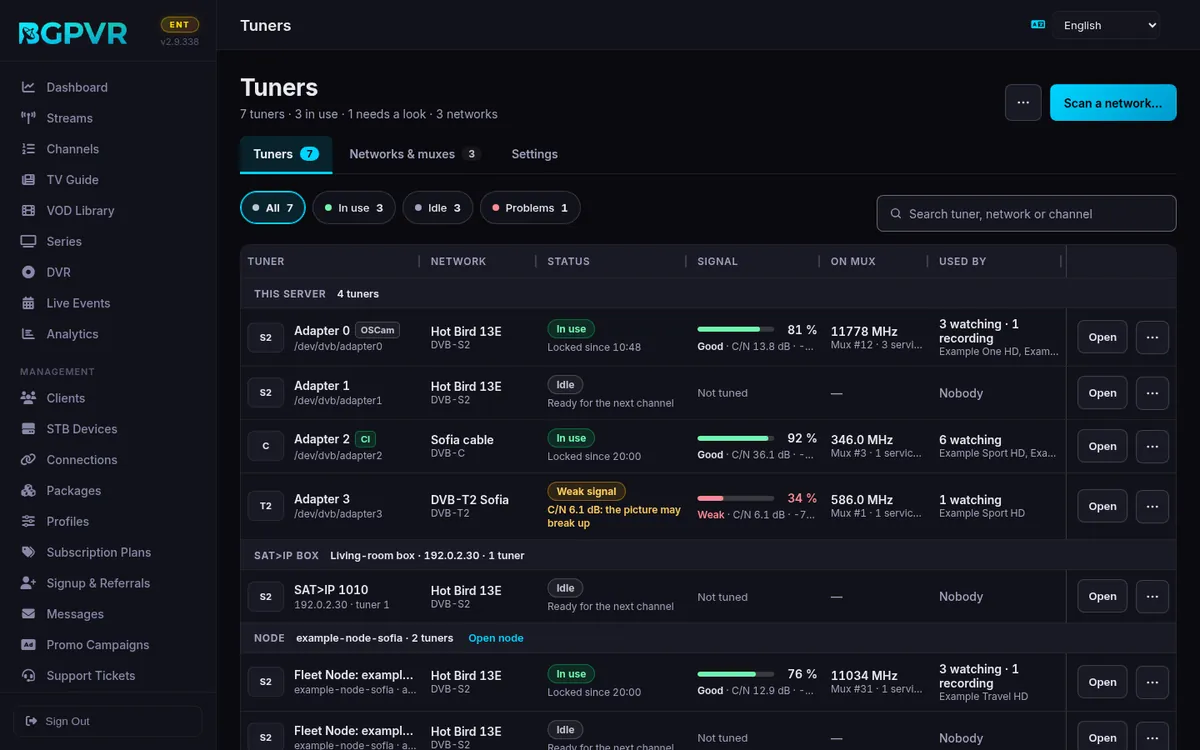
Assign an adapter to a network
On the networks page the "Local DVB Adapters" pills (plus "SAT>IP Remote Tuners" and fleet pills where present) show Idle / Busy (External) / Offline / Ready. Click a pill to open "Adapter N Configuration": Hardware Status (Connected, Frontend OK, CI/CAM Present), Name, Enable Adapter, "Use CI/CAM for scrambled services" (disabled unless a CA/CI device is present), "Forward to OSCam descrambler", "Assigned DVB Network", "Linked Input" grouping, priorities and the advanced tuning fields. Save applies to future tunes.
Create a network and give it muxes
Press "Create Network", name it and pick the network type. Open the network, then either "Add Mux" (frequency in MHz, symbol rate, modulation) or "Presets" to bulk-add a provider/transmitter scanfile — presets are filtered by network type and existing frequencies are not duplicated.
Scan for services
Press "Scan" on the network (from the networks list or the mux page). A live log modal shows "Scanning done/total parallel frequencies" and a running service count; "Run in Background" closes it without stopping the scan, and "Last Log" reopens the last scan log. "Blind Scan" sweeps the whole band with w_scan2 when you have no tuning data — the confirm dialog says roughly 90 candidate frequencies and 3–5 minutes using all free tuners.
Map services to channels
Open a mux (or "All Services" for the whole network), select rows, then "Map Selected"/"Map". The mapping dialog offers: Map encrypted services, Merge same name (link instead of duplicating), Tidy the channel name (strip trailing HD/FHD/4K), and Start channel numbers from (blank appends after your highest existing number; already-used numbers are always skipped). Unmapped/Mapped state and the linked channel are shown in the Mapped Channel column.
Control which muxes feed OTA EPG
On the mux table use the EIT policy dropdown per mux: Auto scans only muxes with proven EIT hits, Allow forces a mux into OTA imports, Skip keeps a noisy mux out even if it once had guide data. The EIT status column shows Unprobed / Scanning / Preempted / Failed / No EIT / event and mapped counts with the last probe time.
Clean up dead muxes
Muxes that returned 0 services on 4 consecutive scans and are not NIT-referenced are auto-pruned and skipped on later scans; you can restore one, or use "Delete Pruned (N)" to remove them all permanently. Individual muxes and whole networks can also be deleted (a network deletion takes its muxes and services with it).
SAT>IP boxes as tuners (2.9.403)
Using a SAT>IP box as a tuner works on every plan and counts against your licence's tuner limit; serving SAT>IP to other boxes (Settings → Tuners → SAT>IP server) needs a Business licence.
Remove an offline SAT>IP box (2.9.435)
When a SAT>IP box no longer answers, its tuners show as offline. The ⋯ menu of such a tuner now offers "Remove the SAT>IP box…": the box and all its tuners leave the list with their settings. If the box comes back, add it again with Add a SAT>IP box.
Watch out
- "Unmap" deletes the channels created from those services — the confirm text says so explicitly. It is not a reversible detach.
- Deleting a network deletes all its muxes and services; deleting a mux deletes its discovered services. Neither can be undone.
- Local adapters are auto-registered at startup, and registration stops at the licence adapter limit (max_adapters: 2 Free, 10 Pro, 50 Business). Extra hardware is silently absent from the list except for a "Skipped N adapter(s)" warning on a manual discovery call.
- Tuners are no longer bound to networks from the network dialog — the modal itself tells you to use the "Local DVB Adapters" pills. Editing the network will not move a tuner.
- The CI/CAM toggle is greyed out on adapters with no CA device; and the Conditional Access banner warns that only CI-enabled adapters can carry scrambled services.
- Blind scan occupies every free tuner for several minutes; on a box that is also serving viewers this is the single most disruptive button on the page. It also returns 501 ("Blind scan is unavailable on this server") if w_scan2 is not installed.
- Scan logs live in /tmp/scan_net_<id>.log, so the "Last Log" button has nothing to show after a container restart.
- Since 2.9.422 a tuner that tunes but sends no data on 2 or more starts in a row shows "No data" (under Problems), with how many starts and the time of the last one. After each failure in a row it rests longer before channels try it again: the Bad Adapter Cooldown (60 s), then 5 times, then 30 times as long, at most 30 minutes; the tuners keep your priority order meanwhile, and one good start clears it. The count survives a suite restart. Check the tuner (on a node, restarting the node often helps) or turn it off. On cable (DVB-C) a node tuner now gets 6 s, not 13, to send its first data (Tuners › Settings, "Wait for a node's cable tuner").