
Messages
Operator-to-subscriber messages, in three tabs: Messages (in-app messages for everyone, a package or chosen clients, with an optional push notification), Announcements (your Telegram group plus a banner on the account page, and the BGPVR forum on the master instance) and Release notes (what the announcement templates insert). Since 2.9.324 the page is built like Clients: a list with status chips and one compose panel.
On this page
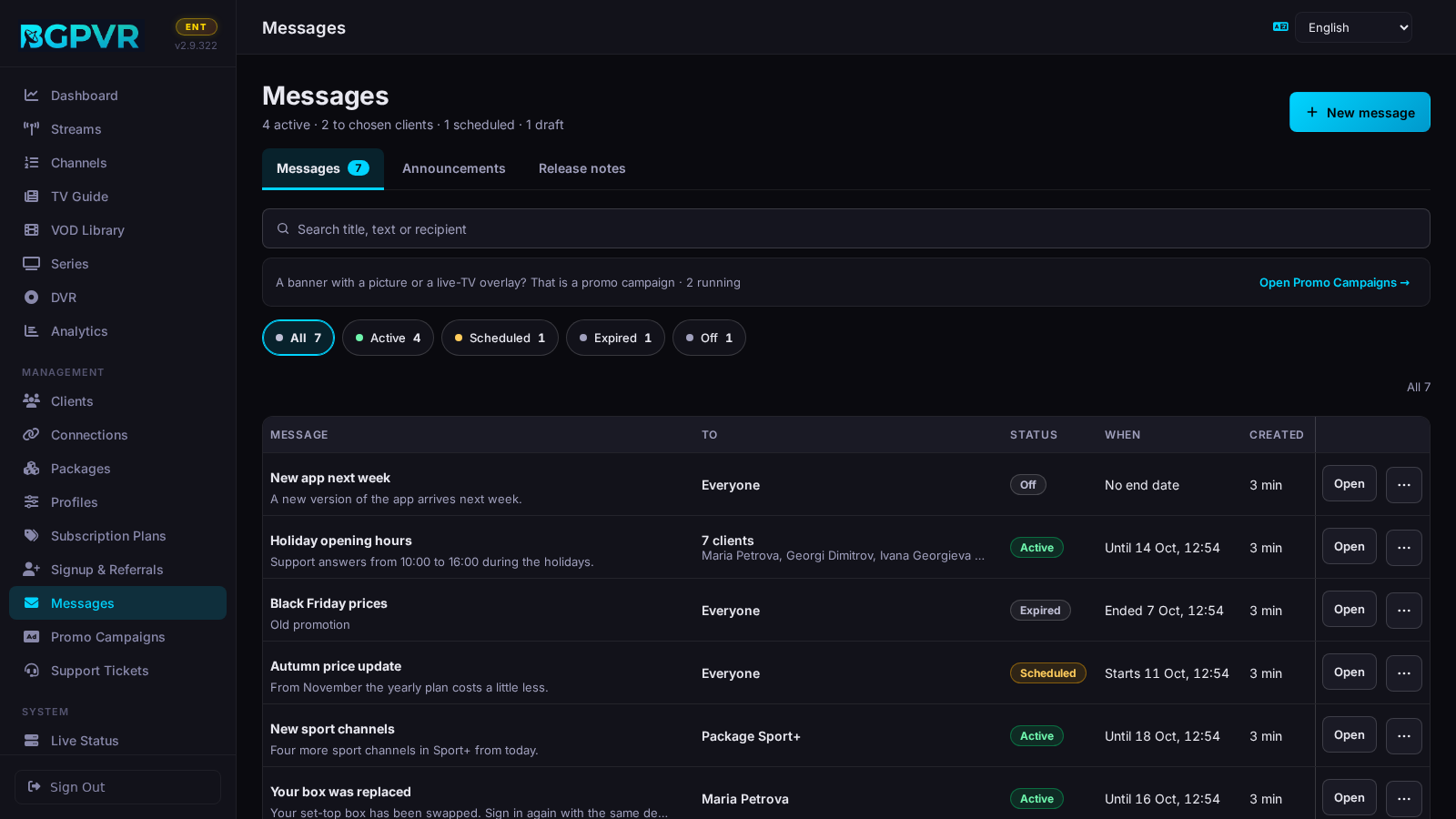
See what is showing
The line under the title counts the messages ("4 active · 2 to chosen clients · 1 scheduled · 1 draft"). The chips filter by state: Active (on and inside its time window), Scheduled (starts later), Expired (its end has passed) and Off (a draft, or switched off). A message sent to several clients is one row ("7 clients" and the first names); a package message says "Package Sport+". The search finds a title, a text or a recipient. Each row has Open, and ⋯ with Edit, Duplicate (send again), Turn off / Turn on and Delete… (asks first, in the page). Times are shown in your computer's time.
Send a message
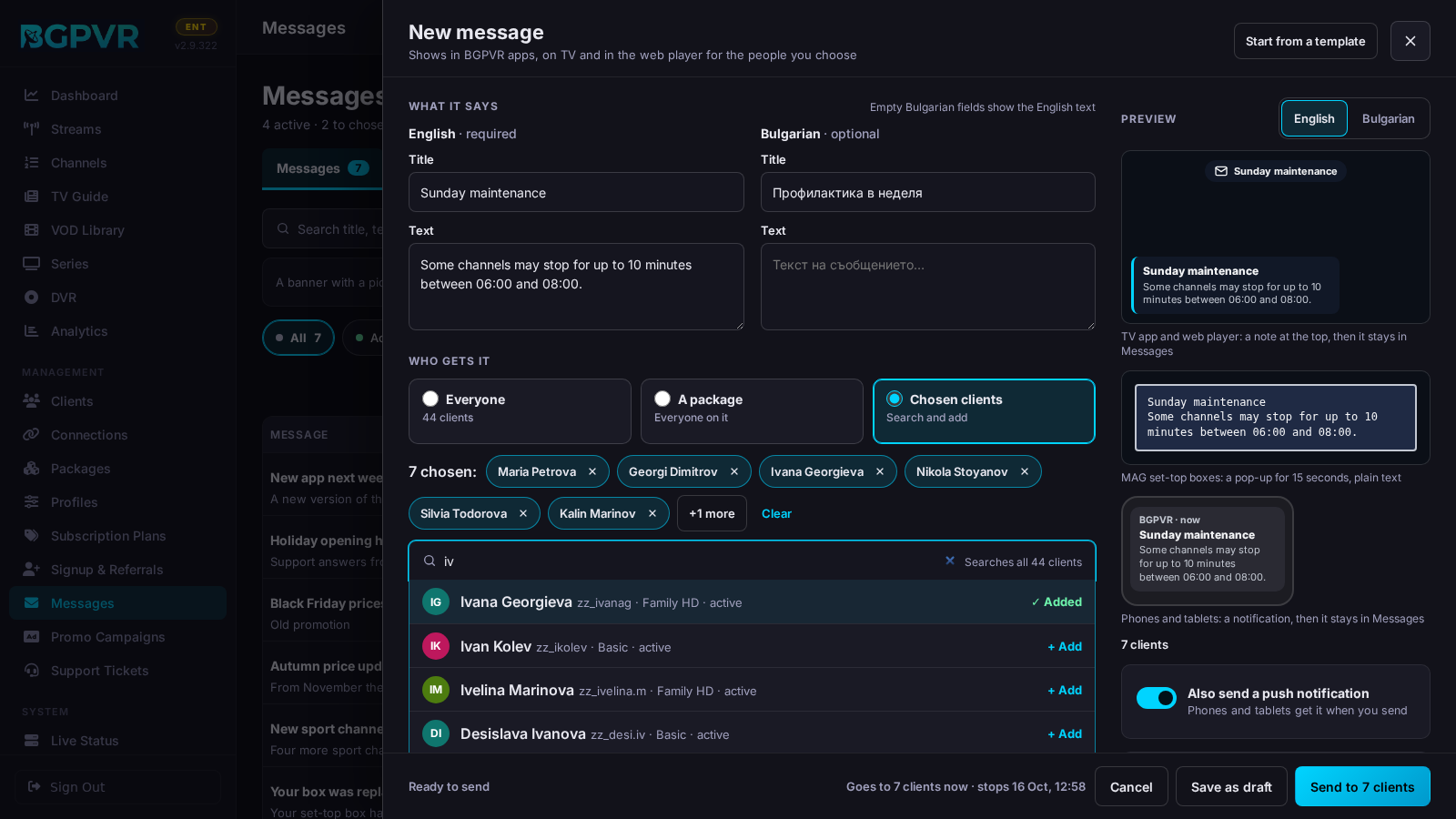
"New message" (top right) opens the compose panel (the whole screen on a phone). What it says: the English Title and Text (the title is required) beside the Bulgarian ones (optional; an empty Bulgarian field shows the English text). "Start from a template" fills both languages: Maintenance, Service restored, New channels, New films and series, App update, Payment reminder, Welcome (the Maintenance text has a {DATE} you replace yourself). Who gets it: Everyone, A package (everyone on it — also a client who moves to it while the message shows) or Chosen clients. When: Start Now or At a set time; Stop after 1 hour, 1 day, 3 days, 7 days (the default) or Never, or type an end date. The Preview shows the note on the TV app and web player, the MAG box pop-up and the phone notification, in English or Bulgarian. "Also send a push notification" is on for a message that starts now. The bar at the foot says who gets it and when it stops ("Goes to 7 clients now · stops Sat 18 Oct"); press "Send to 7 clients" (or "Schedule for …"). "Save as draft" saves it switched off.
Choose the clients
Chosen clients → type in "Find clients to add": it searches every client by name, username, e-mail or client number and lists the first 8 matches ("8 of 111 matches · keep typing to narrow down"). Click a match, or press ↓ and Enter, to add it (once more removes it); with one match left, Enter in the search box adds it. "Add a group" adds the clients who joined this week (New this week) or one of the Clients page's segments (Ends in 7 days, Waiting for email, Expired), with their counts; "Paste a list…" takes usernames, e-mail addresses or client numbers, one per line or separated by commas, and leaves what it did not find in the box. The chosen clients are chips with ✕ ("+N more" shows the rest, Clear empties the list); at most 500 in one message. With nobody chosen nothing is sent — never a message for everyone by mistake.
Change, stop or send again
Open (or ⋯ → Edit) opens the same panel with the message: its text, its clients, its times and "Shown to clients" (off = a draft nobody sees). Only what you change is marked "Changed — not saved yet" and listed in the bar; press "Save changes". Closing with changes (✕, Cancel, Esc, a click outside, Back on a phone, or leaving the page) asks "Discard changes?" in the page. An edit never sends a new notification unless you switch "Notify phones again now" on. To send a message again as a new one, use ⋯ → Duplicate (an end that has passed becomes 1 day). ⋯ → Turn off hides it at once; Delete… removes it for every client it went to.
Post an announcement (Telegram + account banner)
Announcements tab (admins). "Start from a template" → App release, Suite update, STB portal, Samsung TV, LG TV and Web TV (each shows the live version it inserts, with the stored release notes in both languages), Maintenance or Blank. Edit the text (the character count follows), pick "Show the account banner for" (6, 12, 24 or 48 hours — the default —, 7 days, or Never hides) and press "Send announcement". The console shows the text and where it goes and asks once; it posts to the Telegram group at once and adds the banner read by /api/public/announcement. On the master instance with the forum set up, "Also post to the BGPVR forum" adds an optional, longer forum post (Discourse formatting); Telegram and the banner still get the message above it. If the forum answers late (more than 60 s), the console reads the thread back: the post is reported as posted when it is there; otherwise it says "the forum is slow — check the updates thread before sending again" — look before you re-send, or the post goes up twice (2.9.339).
Keep the release notes that feed the templates
Release notes tab (admins). Choose the Component (each with its live version), set "Notes are for version", write "• " lines in the English and Bulgarian boxes (or paste commits into "Raw changelog" and press "AI draft" for a bilingual draft you check), then "Save notes": the announcement templates use them at once. An amber line ("Saved for v1.8.0; the live version is v1.9.0") says when the notes belong to an older version.
Watch out
- The push notification goes out when you send. For a scheduled message that means at once, before the message shows: the switch is off by default then, and switching it on says so. An edit never notifies again unless "Notify phones again now" is on; a draft sends nothing.
- Push needs a delivery route. Hosted push (through the BGPVR licence server) is ON by default and needs only a licence key; without a key it is skipped. Your own Firebase project is an Enterprise white-label option. With no route the message is still saved and shows in the apps.
- Where messages land: the app and Web TV (/tv/) read /api/client/messages (the newest 20 active ones) and the viewer can dismiss each one for good; MAG/Stalker boxes get it as a plain-text pop-up (15 seconds, once per client per message). The web account page does NOT show messages — only announcements. A package message reaches whoever is on that package while it shows.
- A message to several clients is stored as one row per client (so each of them can dismiss it); the console lists, edits and deletes them as one message. The Clients page's bulk "Send message" writes the same kind of message.
- Deleting a message does not recall a MAG pop-up already queued for a box: the queued event keeps the message's end date. Give messages for set-top boxes an end date (7 days is the default).
- Since 2.9.324 the console stores a message's start and end in UTC — what the server compares them with — and shows them in your computer's time. Older consoles stored the time as typed, so a message saved before shows the moment the server really uses (later by your UTC offset).
- "Send announcement" cannot be called back and needs Telegram: without telegram_bot_token or telegram_chat_id (Settings → Telegram) the whole call fails with 503 "Telegram bot not configured in Settings" and no banner is saved either. If Telegram is set up but the send fails, the banner is still saved and the console still says "Announcement sent." — check the group.
- Announcements longer than 4000 characters are split into several Telegram messages on paragraph or line boundaries. The account page shows the 3 newest banners that have not expired, each as a card that reads the text as you typed it: the first line is the title (a one-line message is split after its first sentence), a short line ending with ":" a small heading, lines starting with "•", "-", "–" or "*" bullet points (a short "Label:" at the start of a point in bold) and web addresses (http/https) links; everything else shows as plain text. A message longer than about 8 lines opens folded with "Show all". Each viewer can close one with ✕ (remembered in that browser). There is no control to clear a banner in the console.
- Staff logins see only the Messages tab: Announcements and Release notes are admin-only.
- The version numbers in the announcement templates come from different places — only the App version is a stored setting (Settings → "Module Versions"); the Suite version is the running backend, Web TV and STB portal are read from the deployed frontend files, Samsung and LG from the .wgt / .ipk on disk. "?.?.?" means the file was not found.
- My Account's Home shows a “What’s new” card with a 25-second silent clip of the new My Account (2.9.370): English or Bulgarian with the page, upright on a phone, 16:9 wider; nothing loads until the subscriber presses play. “Don’t show again” hides it for that account in that browser; the clip stays at the top of the help (
/help). It is not one of your messages: there is no setting for it and it does not count as an announcement. The four clips and their posters are served by your own server from/media/whats-new/(about 5 MB each, only on play).