
License & Subscription
Activate or remove the licence key that sets this install's tier, see the numeric limits and the full feature matrix (included vs locked), and raise upgrade requests to the BGPVR vendor.
On this page
- Licensing
- What each tier unlocks
- In the console
- Activate a licence key
- See what your tier actually includes
- Ask for a higher limit or a locked feature
- Change the licence contact email or open the billing portal
- Move a licence to another machine
- What every plan includes since License 1.7.15 (2.9.403)
- Plans and add-ons since License 1.7.23 (2.9.469)
- The active-subscriber allowance
- Licence checks and the verification notice
- Plans since License 1.7.31 (2.9.501)
- One licence, one running server (2.9.503)
- In use on another server: Move licence here (2.9.503)
- Usage above your plan (2.9.503)
- Installation integrity (2.9.503)
- Hosted extras follow the licence (2.9.504)
- Watch out
Licensing
The server validates its licence periodically. Limits and features come from your tier.
| Free | Pro | Business | Enterprise | |
|---|---|---|---|---|
| Subscribers | 10 | 100 | 500 | Unlimited |
| Channels | 100 | 500 | 1000 | Unlimited |
| Concurrent streams | 5 | 100 | 500 | Unlimited |
| Tuners | 2 | 10 | 50 | Unlimited |
| VOD titles | Not included | 500 | 5000 | Unlimited |
What each tier unlocks
- Free the basic Xtream Codes API (live TV and the M3U playlist), mobile app, BGPVR Player only, parental controls, the viewer's own password change, denial slates; remote nodes and API keys follow the plan's numbers (Free: one server, no API keys)
- Pro raises the limits and adds the VOD library, the full Xtream Codes API, EPG grabbers, Stalker/MAG, Kodi/HTSP, Enigma2, HDHomeRun, Series, DVR, timeshift, live events, webhooks, relay streams, user playlists, viewer support tickets, Billing (plans and revenue), self-signup, BGPVR Live+ (1 channel), family sign-ins, the community forum
- Business adds custom stream profiles, Security Locker, multi-STB, STB inventory, advanced analytics, payment gateways, referrals, rewards, AI features, promo campaigns, SAT>IP serving, 2 Live+ channels
- Enterprise adds white-label (including your own Firebase push), unlimited Live+ channels and conditional access (OSCam: for the operator's own subscribed cards only)
Each licence runs one server at a time. After a backup restore or a move to new hardware it follows to the new server by itself once the old one has been silent for about 30 minutes. While the old server still runs, press Move licence here on the Licence page and confirm the link sent to the licence e-mail. Usage above the plan shows a notice, and after 14 days only new additions of that item pause. Viewing never stops.
If it cannot, the install continues for up to 3 days and then falls back to the
Free tier — which will disconnect subscribers above the free limits. This applies
to every key, lifetime keys included: there is no offline licence. Allow outbound
HTTPS to license.bgpvr.com. Licences are bought by card (Stripe) at
license.bgpvr.com; PayPal is not offered.
In the console: License & Subscription
Activate a licence key
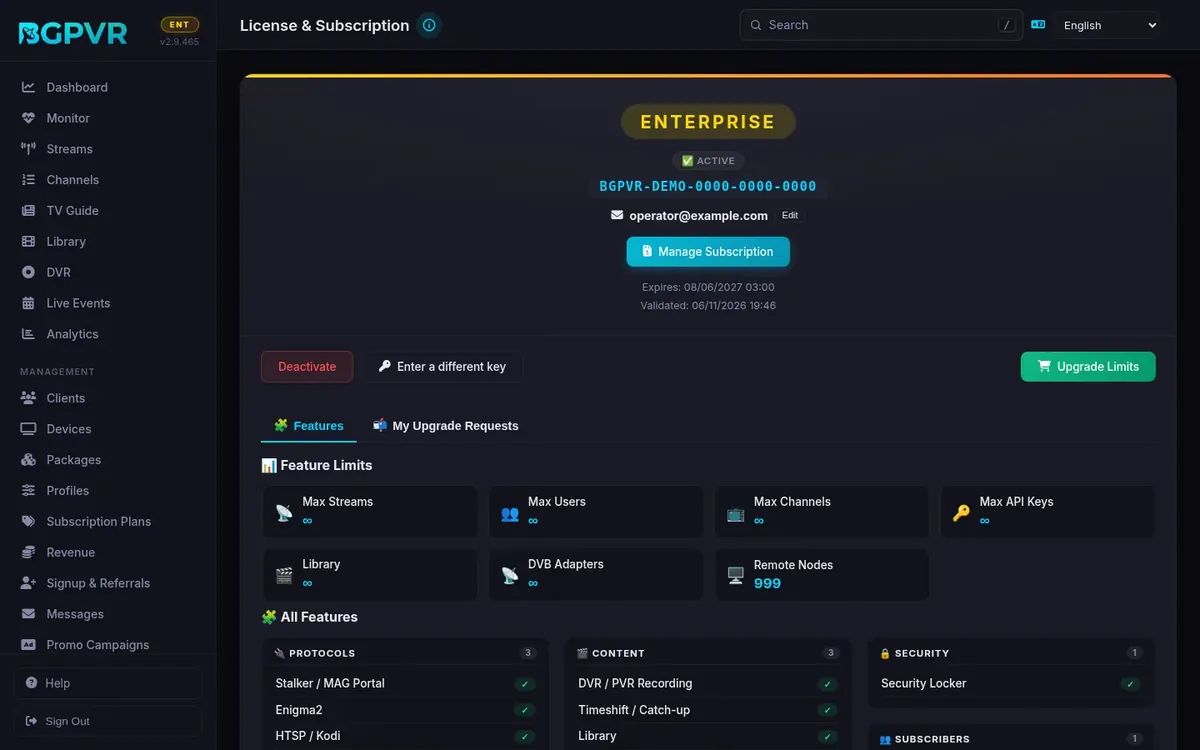
License → paste the key into the field (placeholder BGPVR-PRO-XXXXXXXX) → "Activate". On an already-licensed box the field is hidden behind "Enter a different key" first. The hero then shows the tier badge, status (Active / Verification pending / Expired / Revoked / Not Activated), the key, the customer email, Expires and Validated dates. Activation binds the key to this machine's hardware ID.
See what your tier actually includes
License → "Features" tab. "Feature Limits" shows Max Streams, Max Users, Max Channels, Max API Keys, Library, DVB Adapters and Remote Nodes (∞ where unlimited). "All Features" groups the whole catalogue by category (Protocols, Content, Integrations, Infrastructure, Security, AI, Subscribers, Analytics, Billing, Branding) with a green ✓ for included and a 🔒 <tier> pill for locked. Check this BEFORE promising a customer a protocol — the Modules toggles do not tell you the truth about licensing.
Ask for a higher limit or a locked feature
License → Features tab → "Request ↑" on a limit (choose the desired value) or "Request" on a locked feature, type a reason (required) → "Send Request". Track it in the "My Upgrade Requests" tab: pending (with a Cancel option) → quoted (Accept annual / Accept lifetime-or-until-date / Dismiss) → accepted ("Pay Now" opens checkout). Requests are relayed to the licence server with your key injected server-side.
Change the licence contact email or open the billing portal
License → the "Edit" link beside the email in the hero updates the address registered with the licence server; "Manage Subscription" opens the vendor customer portal for that key. "Upgrade Limits" opens the pricing modal (fetched live from the licence server).
Move a licence to another machine
License → "Deactivate" → confirm. This notifies the licence server to release the hardware binding, then you activate the same key on the new install. A restore or a new server can also take the licence over without deactivating: see "One licence, one running server" and "In use on another server".
What every plan includes since License 1.7.15 (2.9.403)
Every plan: the parental PIN, the viewer's own password change and the "why it won't play" screens; nodes and API keys follow your licence's numbers. Pro adds Enigma2, HDHomeRun and self sign-up; Business adds serving SAT>IP, AI media, the operator assistant and rewards. The EPG grabber Store opens with Pro, the EPG Pack or a grabber bought on its own.
Plans and add-ons since License 1.7.23 (2.9.469)
Three paid plans: Pro, Business and Enterprise (Enterprise is priced "from" and includes 2,000 active subscribers, unlimited nodes and white label). Add-ons on top of a plan: blocks of +100 active subscribers (Pro and Business; on Enterprise once the allowance is in use), +5 nodes (Pro and Business), Priority support (monthly), and two one-off services, Assisted setup and Migration. "Upgrade Limits" shows the prices, excl. VAT, in the currency of your billing country (GBP for the UK, EUR for the EU and other countries); BGPVR also gives them on request. A block add-on has a quantity: choose how many with − and +. The VOD library, DVR recording, Extra streams pack and Stalker / MAG portal add-ons are not sold any more (the plans include what they added): a licence that has one keeps it, and it renews as before. Checkout needs your billing country: set it once in Settings › Billing & payments › Tax information › Country. Cast (Chromecast) is in every plan, Free included.
The active-subscriber allowance
Each plan includes a number of active subscribers (Enterprise 2,000; Pro and Business the plan's own limit), plus 100 for each block bought. Only accounts with an active package count: expired accounts and trial-only accounts do not. Once BGPVR turns the allowance on, License shows "Your plan": active subscribers against the allowance and the blocks bought. Over the allowance a 14-day grace starts and the console warns you; after it only new sign-ups are blocked. Live TV, catch-up, recordings, films and series never stop for anyone. Buy a block under "Upgrade Limits" to raise the allowance.
Licence checks and the verification notice
The server checks its licence with the licence service every 15 minutes. If the service cannot be reached, nothing changes and nothing is shown for the first 12 hours. After that every console page shows "Licence verification pending: reconnect this server to the licence service." with a link to License, where the status reads "Verification pending" and the line under it gives the date the server would switch to the Free plan. Everything keeps working meanwhile, and watching never stops. Three days (72 hours) after the last successful check the server drops to the Free plan until it reaches the licence service again, and the plan then comes back by itself within 15 minutes. A licence that BGPVR has ended, or that has expired, drops to Free within 15 minutes; viewers see none of this.
Plans since License 1.7.31 (2.9.501)
BGPVR Player only is in every plan, from Free; its two options, Signed-in devices only and Also on MAG and TH boxes, are Pro and up. Pro also adds BGPVR Live+ with 1 channel (Business 2, Enterprise no limit), Family sign-ins (Modules > Family members) and the Community Forum. Multi-STB per subscriber, promo campaigns and AI ad detection and removal stay Business and up. Prices are unchanged.
One licence, one running server (2.9.503)
A licence key runs one server at a time. If you restore a backup or move the server to new hardware, the new copy takes the licence over by itself once the old server has been silent for about 30 minutes. A restore on the same machine is picked up automatically within about an hour, or press Move licence here. While the other server is still running, this one shows In use on another server: see the next task. BGPVR may switch this on after a trial period.
In use on another server: Move licence here (2.9.503)
When another server holds the licence, License shows the status In use on another server and this banner: "This licence is in use on another server. This server now runs the Free plan. If this is the server you want to use, press Move licence here." Press Move licence here, then Send the link in the box that opens. A confirmation link goes to the e-mail address of the licence and is valid for 30 minutes; the banner shows the masked address. Open the link and confirm, then press Check now on License: this server takes the licence and the other server drops to the Free plan. A licence can move at most 3 times in 30 days; for more moves, contact BGPVR support. If the licence has no e-mail address, contact support.
Usage above your plan (2.9.503)
When the server uses more than the plan allows, every console page shows a banner with one line per item, for example: "Usage above your plan: channels 120 of 100. From 3 Mar 2027 new additions pause; viewing is not affected." The items are subscribers, channels, Live+ channels, VOD items, adapters and API keys. The date is 14 days after the notice first appeared. From then only new additions of that item pause: new subscribers and sign-ups, channels, Live+ channels, VOD items, adapters or API keys. Nodes are never paused: a node that reconnects is not an addition. Viewing never stops and nothing is deleted. The Free plan is never paused. The banner clears within about an hour after you remove items or buy more under Upgrade Limits. BGPVR may switch this on after a trial period.
Installation integrity (2.9.503)
If files of the installed release are changed or added, the server runs the Free plan until the original release files are back: reinstall or update the release image. The change is reported to BGPVR. If the file list that BGPVR signed for the release image is missing or has been replaced, the server reports it to BGPVR and, once BGPVR switches this on, a paid licence runs the Free plan until the release image is reinstalled or updated. Viewing never stops.
Hosted extras follow the licence (2.9.504)
Push notifications to the apps, EPG grabber downloads, the logo library and BGPVR support are hosted by BGPVR for the server that holds the licence and has checked in with the licence service during the last day. They are served within volumes that fit the plan. On a Free licence, support requests are for billing and account questions. Nothing changes today. BGPVR may switch this on after a trial period.
Watch out
- Deactivate removes the key at once and asks the licence server to release it; BGPVR then fetches a new Free key in the background (normally within seconds). From then on the Free plan applies (see Licensing), and every Pro-and-up feature (Stalker/MAG, Kodi/HTSP, DVR, timeshift, the Library, EPG grabbers, webhooks) stops answering. Until that Free key arrives (for example while the licence server cannot be reached), the previous plan's limits and features may still apply. There is no confirmation beyond the modal.
- A tier shown here can lag reality by up to three days when the licence service is unreachable: the server keeps its plan until three days after the last successful check (see "Licence checks and the verification notice").
- "Could not reach the license server — showing last known state." at the top of the page means the numbers below are cached, not live.
- The feature matrix is fetched from the licence server and cached for an hour; when the server is unreachable on a cold start you see a minimal 10-feature fallback list, not the full catalogue.
- A per-key override (banner: custom license overrides are active) beats the tier matrix — two installs on the same tier can legitimately show different features.
- Only an admin can activate or deactivate a licence. Staff logins can still read the licence status, which the sidebar's tier badge uses.
- Toggling a protocol in Modules does nothing for licensing. A Free install with "Stalker / MAG Portal" switched on still returns 403 from /c/ and /server/portal.php to every MAG box.