
Packages
A package is the entitlement set: which channels, which film and series categories, which channel groups, and which features (Live TV, Timeshift, Catch-up & DVR, Films & series, server recordings, relay channels) its subscribers may have. It is enforced both in the listings and at playback for every surface (app/XC, token M3U, web-HLS, HTSP/Kodi, MAG/Stalker). Since 2.9.323 the page is the list of packages with the open package next to it: four tabs (General · Channels · Films & series · Clients) over one form with one save bar; on a phone the list and the package are two screens.
On this page
- Find and open a package
- Change a package (the save bar)
- General: name, connections, stream profile, features
- Choose the channels
- Hide whole channel groups
- Make a films-only or radio-only package
- Choose the films and series
- See who is on a package
- Create a package
- Duplicate a package
- Delete a package
- Tiers and packs (2.9.403)
- What viewers read next to a package (2.9.403)
- Channels × packages (2.9.403)
- A pack only adds channels; a tier keeps its own settings (2.9.404)
- Recording needs Live TV (2.9.404)
- Change many channels at once with a CSV (2.9.405)
- Set the order of the packs and other packages (2.9.408)
- What viewers see: Compare plans and switching plan (2.9.411)
- Pick your own packages (2.9.412)
- Give a package its own DVR profile (2.9.445)
- Limit how much clients record (2.9.446)
- A package that plays only in BGPVR Player (2.9.489)
- Watch out
Find and open a package
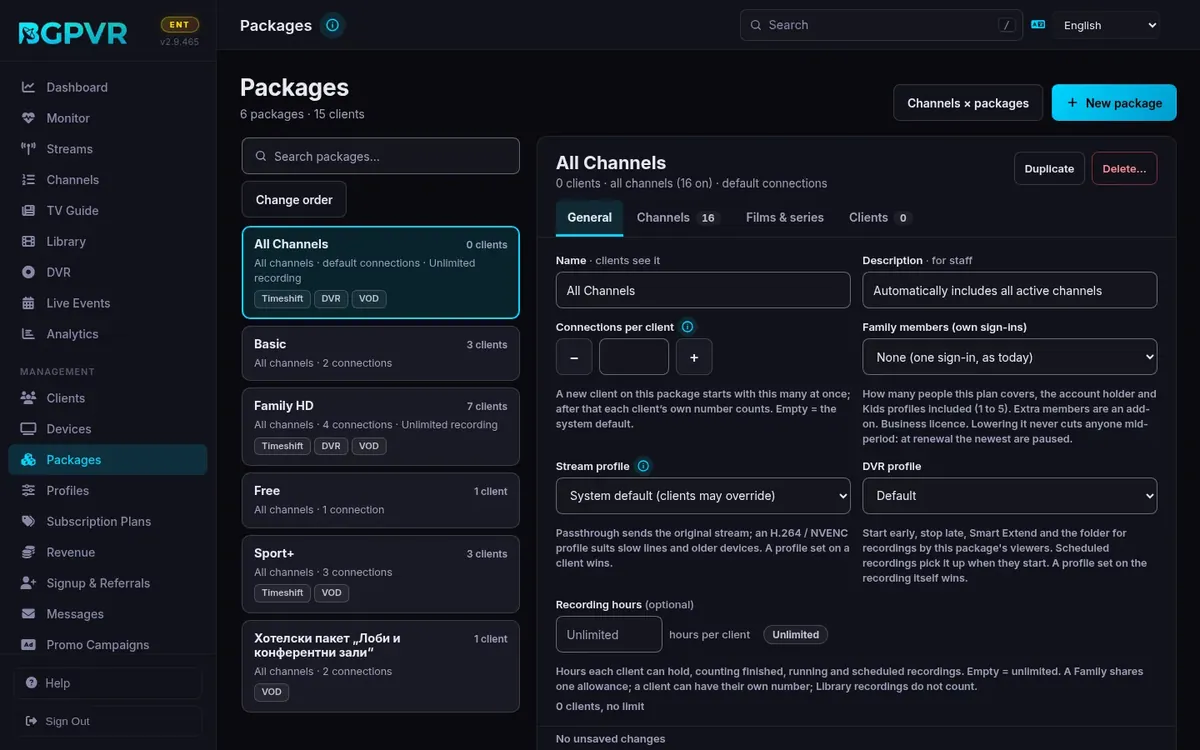
Packages: the cards on the left (with a search box over them) show each package's clients, its channels that are on ("All channels" for an all-channels package), its connections, its job ("free package", "sign-up trial") and the features that are on (Timeshift, DVR, VOD, Recordings). Click a card (or ↑ ↓ and Enter) to open it on the right: its name, a line like "42 clients · all channels (597 on) · 3 connections each", Duplicate, Delete… and four tabs: General · Channels (count) · Films & series · Clients (count). On a desktop the first package opens by itself. On a phone the list and the package are two screens: "Back to the packages" (or the phone's Back) returns to the list.
Change a package (the save bar)
The four tabs are parts of ONE form, so nothing is lost when you switch tabs. Every change is listed at the foot with how many clients it reaches ("2 unsaved changes: Description, Catch-up & DVR · affects 42 clients"; a change of channels reads "8 channels added"), the changed field is outlined ("Changed — not saved yet") and its tab gets a dot. "Save changes" writes the package; its channels, its channel groups and its film / series categories are sent only when they changed. "Discard" asks, then puts the form back as it was saved. Opening another package, "New package", Duplicate, Back on a phone or leaving the page with unsaved changes asks "Discard changes?" in the page first; a reload or closing the tab gets the browser's own "Leave site?".
General: name, connections, stream profile, features
Name (clients see it) and Description (for staff). "Connections per client" (− / +, 1-999999, empty = the system default): a new client on this package starts with this many at once; after that each client's own number counts. "Stream profile": "System default (clients may override)" or a profile; a profile set on a client wins. "What clients on this package get": Live TV (the channels of the Channels tab), Timeshift (pause and rewind live TV), Catch-up & DVR (record and watch later), Films & series (the library of its own tab), Server recordings (recordings made by staff, to watch only) and Relay channels (the re-streamed channels of the Streams page). A feature switched off here stays off for every client on the package, whatever the client's own settings say.
Choose the channels
Channels tab. "All channels": on = every channel that is on is in the package and new channels join automatically (it is synced with every enabled channel on save and whenever channels change); off = only the channels ticked below. With it off: search by name or number, All / In package / Not in package (with their counts), "Tick all shown" / "Untick all shown" (they act on what the search and the filter show) and the channels by group: a group's box ticks or clears the whole group (it is half-ticked when some are), each group says "12 of 40", a big group has "Show N more". Channels that are switched off on the server (for example the adult channels) are a separate greyed group at the end, "33 channels switched off on the server — not offered to anyone": nothing new can be ticked there, but a channel this package still holds stays enabled so you can untick it to drop it (otherwise it would be offered again the moment that channel is switched back on); a save keeps any switched-off rows you leave ticked.
Hide whole channel groups
Channels tab → "Channel groups clients see": switch a group off to hide it from this package's clients even where its channels are ticked. With "All channels" on, this is how to leave out a whole group (for example Adult) while new channels still join. Every group on = no limit. Every group off cannot be saved (an empty list means "every group" on the server): switch Live TV off in General instead.
Make a films-only or radio-only package
General → untick "Live TV". Live channel playback then returns 403 "Live TV not included in your plan" on every surface and the channels disappear from the listings, while films and series still play (the Channels tab says Live TV is off). Radio is deliberately exempt (channels flagged as radio, or in a group whose name contains "radio", keep working). Untick "Relay channels" to also hide the re-streamed channels of the Streams page from this package's XC/app and MAG listings.
Choose the films and series
Films & series tab: the film categories and the series categories as on / off chips, with "Find a category", "Turn all on" / "Turn all off" and "N of M shown". Every category on = no limit (new categories show too); with some off, only the ticked ones show. A list with no category on cannot be saved (an empty list means "every category"): switch Films & series off in General instead. When Films & series is off for the package the tab says so. Since 2.9.323 these lists (and the channel groups) are saved with "Save changes" like the rest of the form; before, every click saved at once.
See who is on a package
Clients tab: the clients on the package, 25 a page (50 / 100 to choose), with their username, status and expiry ("Never", or "Expired <date>" in red); search by name or username. A name opens that client's panel on the Clients page. A client's package is changed in Clients (Edit → Subscription, or for several at once with the bulk bar).
Create a package
"New package" (top right) opens an empty package on the right with the usual defaults: Live TV, Timeshift, Catch-up & DVR, Films & series and Relay channels on, Server recordings and All channels off. The foot says "A new package needs a name." until it has one, then "Ready to create.". Pick its channels and lists in the other tabs if you like and press "Create package": it is created and opened. "Discard" drops it and goes back to the package that was open.
Duplicate a package
Duplicate (in the package's header) makes "<name> (copy)" ("(copy 2)" … when that name is taken) with every setting, the locker mode too, its channels and its film / series / channel-group lists, and opens it. No client and no subscription plan moves to the copy.
Delete a package
Delete… (in the package's header) asks in the page, with the focus on Cancel: it says how many clients are on the package — and what will happen to them on THIS install: when a free package is set and the expiry action is not "lock", they move to the free package (named), which never expires; otherwise they are left without a package and cannot watch until you give them another one. It also says how many subscription plans give it, and that it cannot be undone. The free package and the sign-up trial package (both chosen in Signup & Referrals) cannot be deleted: the page says so and where to choose another one first.
Tiers and packs (2.9.403)
A package is a Tier, a Pack or an Other package (General → "Tier or pack, and what viewers read"). A tier includes the tier you pick in "Includes the tier", and the ones below it, so you tick only its extra channels: the channels it inherits show greyed with "from a tier below". A pack adds channels on top of a viewer's tier, a month at a time and never past the plan's end; give it in Clients → Subscription → Packs, or sell it with a subscription plan whose package is the pack. Devices, Timeshift, recording and films always come from the viewer's tier and paid add-ons, never from a pack. The upgrade created Orbit → Zenith → Cosmos and the packs Pulsar, Aurora, Curiosity, Comet and Nightfall EMPTY: fill them in the editor. Today's packages stay as Other packages.
What viewers read next to a package (2.9.403)
Every tier and pack gets a Bulgarian name and one short line saying what it is, in English and in Bulgarian (for example "Sports channels" / "Спортни канали"): My Account, the plan lists, the sign-up page and the console show it next to the name, in the viewer's language (the other language when one is empty). A pack also gets a kind of channels (Sport, Films & series, Documentary, Kids, Country / language, 18+), shown as a label where the pack has no line of its own. The page warns while a tier or pack misses a name or a line.
Channels × packages (2.9.403)
Packages → Channels × packages: every switched-on channel against every package, ● in the package's own list, ○ from a tier below, with each package's count; a warning names how many channels are in no package. Download CSV gives the same table for a spreadsheet.
A pack only adds channels; a tier keeps its own settings (2.9.404)
When Kind is Pack, the editor hides Connections per client, Stream profile and the feature cards and says so in one line: a pack only adds channels; devices, features and the stream profile come from the viewer's base package and paid add-ons (the values stored on the pack stay as they were). A pack's card and header no longer show connections or feature labels. A tier's header counts what its viewers get, the same number as its card, with the split, for example "282 of 629 channels (164 own + 118 from lower tiers)"; the Channels tab still edits the tier's own list. Each tier has its own settings: a viewer on Cosmos gets Cosmos's connections and features; channels add up from the tiers below, settings do not. Channels × packages lists the tiers in ladder order (the first step first), in the table and the CSV.
Recording needs Live TV (2.9.404)
A viewer can record only a channel they can watch live: with Live TV off, a package gives no recordings, even with Catch-up & DVR on (there are no recordings-only packages). The package editor says so under the switches while Live TV is off and Catch-up & DVR is on, and the client editor says it under the features when the client's package has Live TV off.
Change many channels at once with a CSV (2.9.405)
Packages → Channels × packages → Download CSV, open the file in Excel or Google Sheets, change the package columns and save it as CSV UTF-8 (comma or semicolon), then Upload CSV. In a package's column own, ●, x, 1, yes or да puts the channel in the package's own list and an empty cell takes it out; inherited (○) means the channel comes from a tier below and is ignored: tick it in the lower tier instead. Channels are found by number, then by exact name; columns by the package's name. Nothing is saved until you have seen the preview: what each package gains and loses, and the rows, columns and cells the page did not recognise (they are left out, never guessed). Apply changes writes it all at once. Only tiers and packs change; tick "Also change … other packages" to include the older packages. Protected packages (test packages and the packages of protected accounts) and All channels are never changed. A channel you delete from the file, or a switched-off one, keeps its place; a channel outside a package's channel groups is not added (the preview says so). Undo last upload puts the lists back as they were before the last upload, within 24 hours and only while nobody has changed those packages since. At most 2 MB and 5,000 rows.
Set the order of the packs and other packages (2.9.408)
Packages → Change order: the packs and the other packages each get ▲ and ▼ (or Tab to a button and press Enter or Space); each step is saved at once, and Done shows the cards again. This one order is used everywhere packages or plans are listed: the package list, Channels × packages and its CSV, Record a payment, Subscription Plans, sign-up and My Account. Tiers have no buttons: they follow the ladder, each right after the tier it includes, so to move a tier change what it includes. Plans follow their package, then the shortest first, then the cheapest. A new package or a copy goes last in its group. The order only changes how lists are shown: no client, channel or plan changes. On the first start of 2.9.408 the packs are put in this order once, when no order was set yet: Pulsar, Aurora, Curiosity, Comet, Nightfall, UK, then any other pack by name.
What viewers see: Compare plans and switching plan (2.9.411)
My Account › Plan & payment shows Compare plans: every plan on sale side by side in the one order (the tiers by the ladder, then the other packages), for 1 or 12 months, with the price, the channels (a channel's HD, SD and +1 versions count as one: "bTV", "bTV HD" and "bTV+1" are one channel, the full number is shown under it), screens, Pause & replay, Recording and Films & series (an add-on with its price when a plan lacks it), and "+N channels vs yours": the channels a plan adds, by category (the channel's genre) with logos. 18+ channels are counted, never named, and a pack's 18+ names show only after the viewer's adult PIN. Every pack has See channels: its channels and today's price (the share of the month left on the plan). Switching follows one rule, worked out by the server and shown before paying: a dearer plan per day (list prices) starts at once and the whole days left × the price the viewer actually paid per day (the last payment for that package: a birthday price or a 12-month plan lower it) become days of the new plan, to the nearest whole day and at least 1 day (each day at the price of the payment that bought it, newest first; days no payment covers, such as gifts or a birthday gift, count at the list price per day of the plan they are on; a payment in another currency counts at its plan's price in the new plan's currency; an account with no payment on its package, such as one made by staff or imported, has its days counted at the package's lowest list price per day; days an earlier upgrade moved over keep their value); a cheaper or equally priced plan is paid now and starts when the current plan ends (no refund, no conversion; the expiry sweep switches the package on that date; renewing the current plan meanwhile moves that date on; a refund of that payment cancels it and the payment then says its days are still on the end date); a pack that would run past the new end is cut there and its cut days' value is added as days. The same sum is applied when any gateway reports the payment, once; a second payment at the same time is a plain renewal. A trial, the free package, an ended plan or a package with no price keep today's rule (the days are added after what is left). Record a payment (staff) keeps its own rule: it extends the plan, nothing is converted. The viewer sees the result on Plan & payment for 30 days. Sign-up shows each plan's channels and facts the same way.
Pick your own packages (2.9.412)
Packages › a package of kind Pick your own › the Pick your own tab. Sizes and prices: each size is two plans, a month and 12 months. Add a size adds another one, and On sale turns a size on or off for viewers. A size goes off sale by itself while fewer channels can be picked than it holds, and the tab says why. A price change applies to the next payment. Channels viewers can pick: Add all and Remove all work for a whole tier or pack, search finds a single channel, and each channel shows how many viewers picked it. Channels rated 18+ are hidden unless Show 18+ channels is ticked; then the adult PIN rules apply. A channel's HD, SD and +1 copies count as one pick. If you untick a channel that viewers have picked, they keep it until their renewal and choose a free replacement. Free change window (hours): one free change (one save, any number of channels) within this many hours after a payment. The default is 48. Screens and features are set on the General tab. The default is 1 screen and live TV only; viewers buy the existing add-ons for replay, recording and films, and another screen through Devices. After the upgrade the suite creates a package called "Pick your own" ("По мой избор" in Bulgarian) with sizes 5, 10, 20 and 30 at the suggested prices, all off sale. The channels viewers can pick start as every tier channel and every pack except 18+ packs and country packs. You turn the sizes on when you are ready. The trial at sign-up stays every channel for 7 days. At sign-up, Pick your own is one choice: the viewer picks the size and the channels in My Account right after, then pays.
Give a package its own DVR profile (2.9.445)
Open the package → General → DVR profile. Default leaves the package as it was. With a profile chosen, a recording made by a viewer on this package takes the whole profile: Start early, Stop late, Smart Extend, folder, file names and ad handling. The order is: a profile set on the recording itself, then the viewer's main package, then the default profile. A pack on top of the main package does not count. Recordings already scheduled pick up the profile when they start, also those made by a series rule; a recording keeps the profile it started with, so a later change or a move to another package does not reach it. Your own recordings, with no viewer, stay on the default profile or the one they name. A profile a package uses cannot be deleted: set the package to Default first. A viewer's own Stop late still counts when it is longer. How long recordings are kept does not change: a viewer's recordings keep the viewers' own keep period.
Limit how much clients record (2.9.446)
Open the package → General → Recording hours. Type the hours each client can hold, a whole number from 1; leave it empty for unlimited, which is how every package starts. Finished, running and scheduled recordings all count, by the programme's start and end to the minute (the usual Start early and Stop late are not counted; what a viewer adds above 2 and 5 minutes is). A Family shares one allowance. Recordings published to the Library do not count: they are yours. Near full starts at 80 %. While you type, the page shows how many clients are fine, near full and full, and the save bar says how many a lower number would put over. Nothing is ever deleted: those clients keep what they have and cannot add recordings until they delete old ones. A pack has no hours of its own.
A package that plays only in BGPVR Player (2.9.489)
With Modules > BGPVR Player only on, open the package and tick Players > BGPVR Player only, then Save: the same "who would lose it" question comes first. Every channel of the package then plays only in BGPVR Player for its clients, with catch-up, timeshift and recordings. A client who also gets a channel from a package that is not marked keeps that channel in every player. A tier's mark applies to the clients who have that tier as their package, on its channels and those of the tiers it includes; clients of a higher tier that includes it keep those channels in every player unless their own tier is marked (2.9.507).
Watch out
- Deleting a package sets package_id = NULL on every member. Those accounts are then treated as having no subscription: they drop to the Free Tier package if one is configured in Signup & Referrals, and are locked out entirely if none is (or if "When a paid subscription expires" is set to Lock). Move the members first (Clients → bulk bar → "Change package…"); the Clients tab of the package lists them.
- A subscription plan whose package is deleted keeps pointing at it: a purchase of that plan then gives no package. The Delete question counts the plans that give the package; change them in Subscription Plans first.
- "Connections per client" is a starting value: invites, sign-ups and staff copy it onto a new client, and playback then counts each client's own Max Connections. Changing it here does not change existing clients. Since 2.9.325 trial, free and invite sign-ups copy the package's connections and its "Films & series" switch exactly (see Signup & Referrals).
- An empty list means "no limit" for film categories, series categories and channel groups alike, so "nothing ticked" cannot be stored: the page refuses it and says to switch the feature (Films & series, Live TV) off instead.
- The package's locker mode is not on this page; a save sends it back unchanged (up to 2.9.322 every save from this page wiped it to "System Default"). Duplicate copies it.
- Channel-membership enforcement at play time has a kill switch: the setting enforce_package_channels (default on). Turn it off and a subscriber can play any channel id even though the listings still filter — only turn it off as a temporary rollback.
- "Server recordings" only exposes ADMIN-made (ownerless) recordings, watch-only. The app and the web player show that list only to DVR-enabled users, so there the feature needs Catch-up & DVR as well (the General tab says so when it is off). MAG boxes (2.9.317) show their Recordings tile whenever the feature is on, even without DVR; the list holds up to 500 recordings, newest first, and never pushes out the subscriber's own; past 500 the header count reads "500 / <total>".
- The free package and the sign-up trial package (Signup & Referrals) cannot be deleted; the API refuses with 400 ("Cannot delete the free tier package…", or code signup_trial_package). Choose another one there first.
- Staff need "Manage Packages" to change anything here (every write under /api/packages); a staff login without it that opens the page by a link sees it read-only, with a note why.
- "Affects N clients" counts every account on the package, whatever its status (pending, disabled and expired ones too).
- Nightfall and every 18+ pack: its channels must be marked adult (Channels, genre Adult), or they play without the adult PIN. The editor warns how many are not; adult channels never reach the iPhone / iPad app.
- Since 2.9.403 every protocol (Xtream, M3U, Enigma2, MAG, Kodi, playback) gives exactly the package's channel list cut by its group list. The upgrade added to each package's group list the groups of the channels in its own list, so nobody lost a channel; those channels now also show on Xtream and MAG.