
Feedback Inbox Pro
Needs a Pro licence or higher.
The reports the apps and boxes send by themselves: playback errors, app errors, TV start-up errors and remote key tests. Since 2.9.324 it is the same inbox as Support Tickets, with the reports grouped by problem: one row per problem (the report's first line, e.g. "HTTP 404 on Diema Sport") with how often and on how many devices it was seen. A report is resolved, ignored or noted — nobody replies to it. Two tabs: Reports and Remote key profiles (moved here from the Support Tickets header). The menu entry shows when the Telegram feedback module is on, as before.
On this page
Triage the reports
Feedback Inbox opens on Automatic reports → "All open"; "Playback errors", "App errors", "TV start-up" and "Remote key tests" show one kind, Archive → "Resolved", "Ignored" and "Everything" the closed ones. Each row is a problem: its text, "Seen 5 times · 4 devices", the platform and version of the latest report and when it was last seen. Pick one: the right side shows how often, first and last seen and the kind, the AI summary if any, the latest report in full (with its context and stack), and "When and where" — the latest 50 reports with the time, the device, platform and version, the client (a link to their panel) and the status of each.
Resolve, ignore or note a problem
"Resolve N" closes every open report of the problem, "Reopen" opens them again; ⋯ has "Ignore N", "Analyse with AI" and, last and red, "Delete all N…" (asked in the page). Add a private note in the box at the foot (staff only). "Select" above the list resolves, ignores or deletes several problems at once.
Turn a key test into a remote key profile
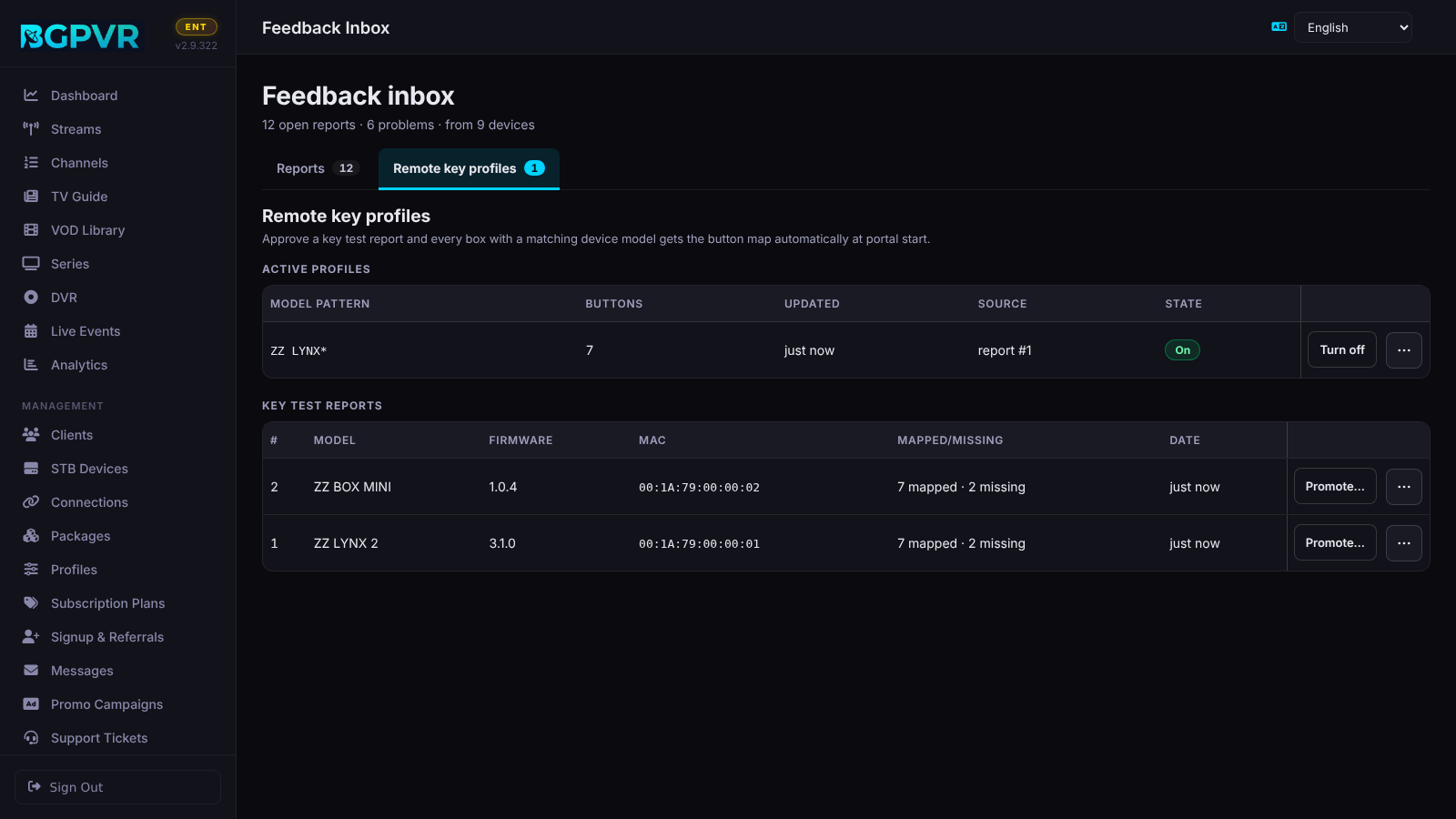
A remote key test (Settings → Diagnostics → Remote key test, or /keytest as the portal URL) arrives under "Remote key tests". Open it and press "Make a remote key profile…" (also in ⋯), check the model pattern (* is a wildcard, e.g. LYNX*) and press "Save profile": every box whose model matches gets that button map at portal start. The Remote key profiles tab lists the profiles (pattern, buttons, updated, from which report, On / Off; "Turn off" / "Turn on", Delete in ⋯) and the key test reports (model, firmware, MAC, mapped / missing, date; "Promote…", "Delete report" in ⋯). Deleting a report keeps a profile already made from it.
A HLS fallback that worked goes straight to Resolved (2.9.487)
When an app reports that its switch to HLS worked ("HLS fallback played after N ms"), the report is stored already Resolved: it does not count as open and is not in the open list, so only reports that need a look stay there. It stays under Resolved, and Dashboard > Recent activity still says "recovered on HLS in N ms" on the matching error. A fallback that failed stays open as before. Neither kind counts as a device problem. The ones an older version left open were resolved once, when 2.9.487 started.
Watch out
- The sidebar shows a blue dot for new reports; a new remote key test shows an amber key instead. Both clear when the page is opened.
- "Resolve N" acts on every open report of the problem, not only the 50 shown; "Delete all N…" removes them and their screenshots for good.
- Reports are grouped by their first line: the same error with a different detail in the first line counts as another problem.
- The AI actions need the Business tier and a reachable model; without the tier they are not offered.
- Since 2.9.344 the app's crash reports (BGPVR Player 1.8.5 build 2354 and later: sent at the next start after the app closed unexpectedly, only while its Automatic diagnostics is on; first line
app_crash: <reason> on <device>) are automatic reports under "App errors", grouped by problem like playback errors (the same reason on the same device model is one problem). They are never support tickets and never "Needs reply".