
TV Guide
The day-to-day operational view of guide data: a now/next card per channel with a progress bar, a per-channel schedule, programme search, and one-click record / series pass. It also carries a cut-down EPG source dialog for quick jobs.
On this page
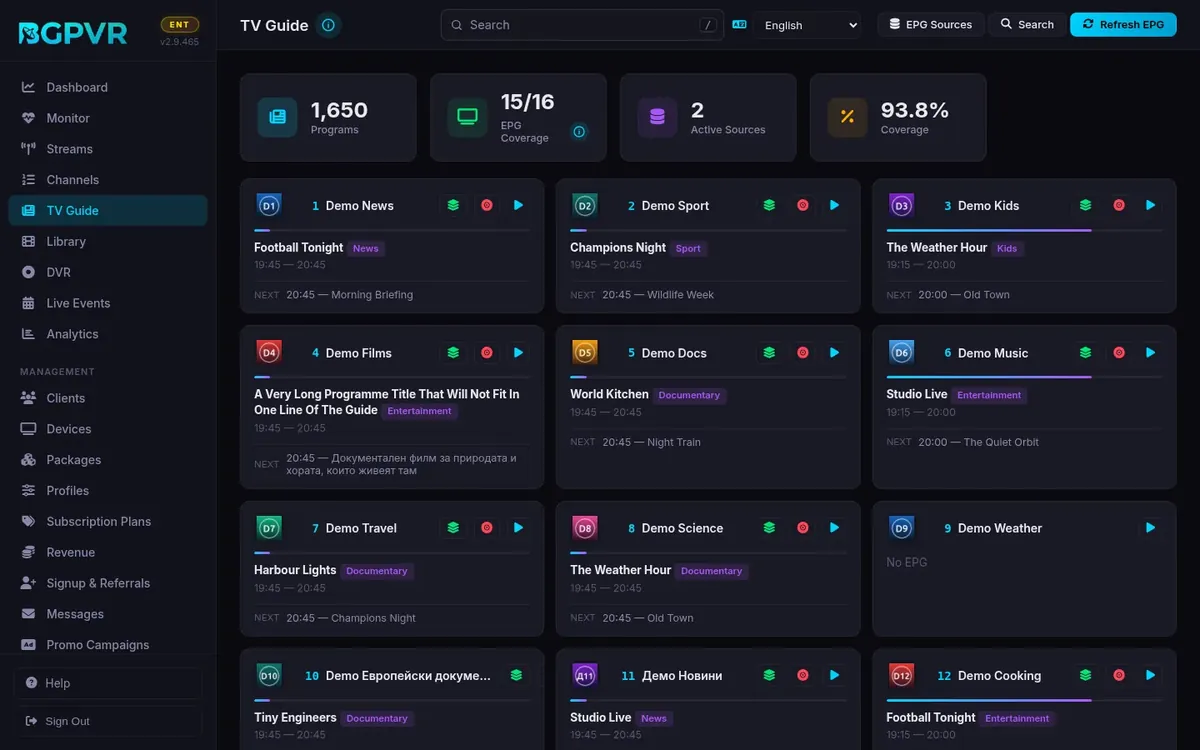
See at a glance whether the guide is healthy
The four stat cards read Programs, EPG Coverage (mapped/total channels), Active Sources and Coverage %. A card showing a grey "No EPG" has no programme airing right now — fix it in EPG Manager → Mapper.
Add an XMLTV source quickly
Header → "EPG Sources" → fill Source name and XMLTV URL → "Add & Import". It imports synchronously. The same dialog lists existing sources with per-source refresh and delete buttons.
Force a guide refresh
Header → "Refresh EPG" re-imports every enabled source in the foreground and toasts "EPG refresh complete". OTA sources are not imported inline — each is kicked off as a background tuner scan and reported as "started".
Record a programme or set up a series pass
Click a channel card to open its schedule, or use the buttons on the card itself. The red record-vinyl icon opens "Record from EPG" (Program title, DVR Profile, optional series group name, VOD Category, "Move to VOD" checkbox). The green layers icon opens "Create Series Pass", which matches on title and can be limited to the current channel.
Find something in the guide
Header → "Search". "Keyword" searches titles as you type (2+ characters, 400 ms debounce); "Ask AI" takes a natural-language query and only runs on Enter. Results carry the same Record and Series Pass buttons.
Watch out
- The quick-add form here always creates a plain XMLTV source with priority 10 and a 12-hour refresh interval. To add a grabber or an OTA source, or to set priority/refresh, use EPG Manager → Add Source.
- The add form toasts "EPG imported successfully" even when the import failed — the backend returns 201 with an error payload (the source row is created, empty). Verify in EPG Manager → Sources that Last Updated is not "Never".
- The delete confirmation says "Channels will lose their mapping" — that is not what happens. Deleting a source removes only the source row: the channel's EPG ID is untouched, and its programmes stay and keep being served until they age out — anything that ended more than 7 days ago is pruned automatically (Backup → Database maintenance). Future listings from the deleted source are therefore still shown until a few days after they air.
- Record and Series Pass buttons only render for programmes that have not ended. A programme currently airing is still recordable.
- All EPG times are stored UTC and rendered in the browser's local timezone. Do not re-interpret stored timestamps as local time.
- The Refresh EPG toast reports completion, not counts — the English strings carry no numbers. Read the per-source Last Updated column in EPG Manager to confirm a source really imported.