
Clients
The subscriber database — every account that can log in on any playback surface (BGPVR Player app, Xtream-Codes players, token M3U/Kodi, MAG/Stalker, Enigma2, web). Also holds per-account security, deletion requests and dormant-account purging, as five tabs across the top: Clients · Connections · Security · Pending deletions · Inactive / Purge. The invite codes moved to Signup & Referrals → Invites in 2.9.323: the link "Invite codes → Signup & referrals" at the end of the tab bar goes there. Since 2.9.321 the Clients tab is a list with status chips, filters, pages and bulk actions, and each client opens in a side panel that shows the whole account at a glance. Since 2.9.322 Edit opens a wide side window with its tabs (the whole screen on a phone); 2.9.379 added the App tab.
On this page
- Create a subscriber
- Edit a client (the Edit window, 2.9.322)
- Change one customer's app settings, or lock one (the App tab, 2.9.379)
- Give the customer their credentials and links
- Kill a leaked playlist
- Find the accounts you care about
- See one client at a glance (the client panel)
- Change many clients at once
- See how long someone has been a customer ("Member since")
- Record a date of birth
- Renew, upgrade or extend an account
- Issue invite codes
- Handle deletion requests and dormant accounts
- Know what happens after a deletion request
- The Payments tab (2.9.401)
- Packs on top of the package (2.9.403)
- Paid add-ons (2.9.403)
- Packs: Follows plan and quick choices (2.9.404)
- Parental PINs are stored more safely (2.9.416)
- Enigma2 bouquets: one plain stream and the player on the box (2.9.417)
- Every guess at a channel PIN counts (2.9.417)
- One box for film and series categories (2.9.418)
- Watching syncs for every kind: Continue watching (2.9.435)
- Give one client their own recording hours (2.9.446)
- Find an account by its number (2.9.451)
- Who signed a TV into a Kids profile (2.9.451)
- The Family tab and places (2.9.470)
- Family members in the Clients list (2.9.472)
- Join a family (2.9.473)
- Who pays for what, and gifts (2.9.474)
- Password resets sign the apps out (2.9.490)
- Play on TV in BGPVR Player (app 1.9.8)
- Move to another device in BGPVR Player (app 1.9.9, renamed in 1.9.10)
- Switch the TV off and on from the phone (app 1.9.8)
- Sound and subtitles in BGPVR Player (app 1.9.10)
- Watch out
Create a subscriber
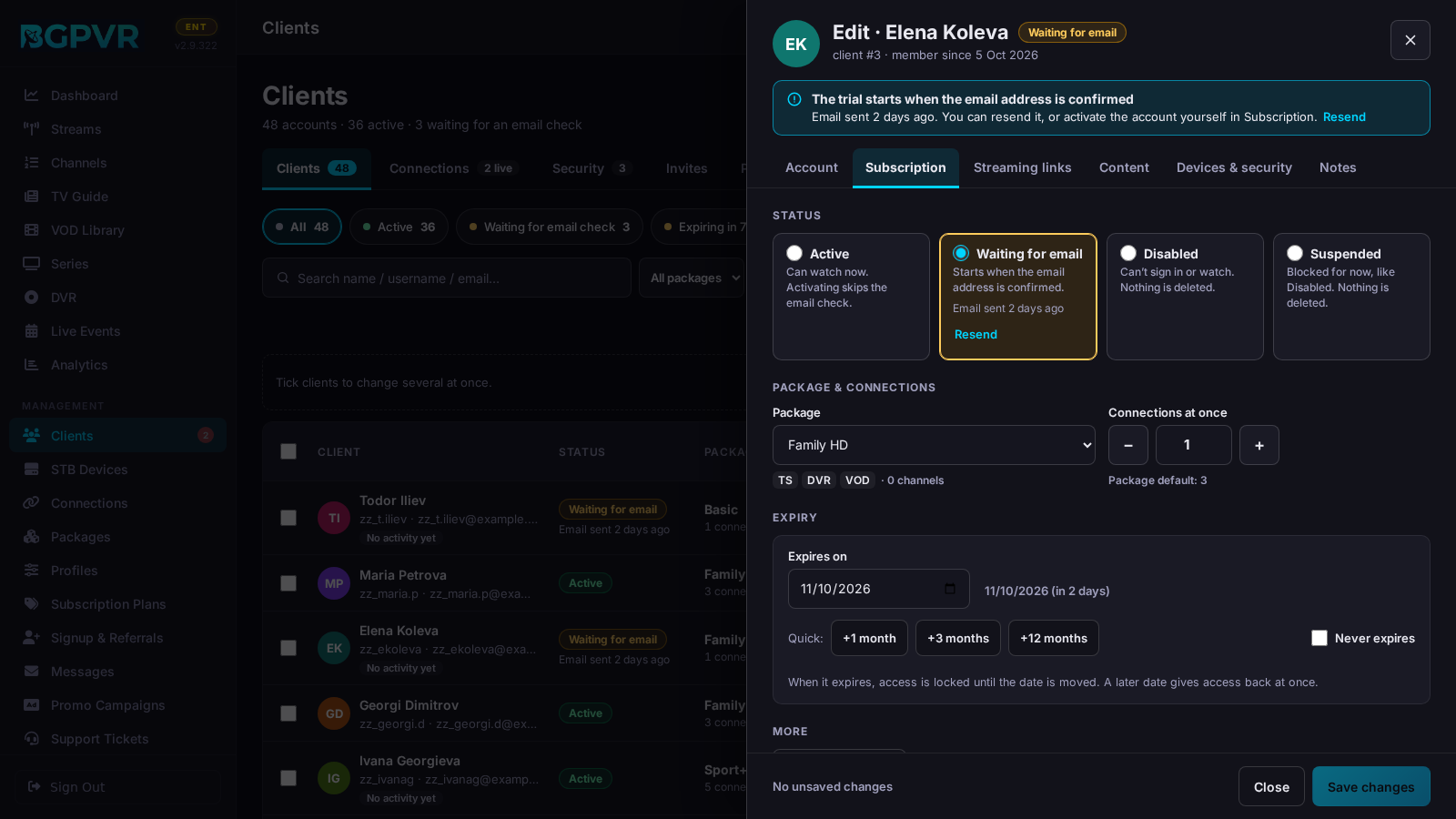
Clients → "Add client" (top right). It opens the same window as Edit, with five tabs (no Streaming links or App until the client exists). Account: Username and Password are the only required fields ("Generate" makes a 12-character password without look-alike characters, like Kq7m-T3xa-Wn9P; passwords are stored encrypted). Display name, Email and Phone are optional, but the email must be unique: a duplicate is refused with "Another account already uses this email address". Subscription: the status as cards (Active, Disabled, Suspended), the Package (with what it includes and how many channels), Connections at once (− / +, with the package's default), the expiry (a date, +1 / +3 / +12 months, or "Never expires", which is ticked for a new client: untick it and pick a date) and, under Advanced, the transcode profile (empty = package / system default). Content: Timeshift, Recordings (DVR) and Films & series (VOD); the film and series categories can be chosen once the client exists. Devices & security: how many set-top boxes are allowed, "Where they can watch from" (the locker mode) and the allowed IP addresses (comma-separated, CIDR accepted, empty = anywhere). Notes: your own notes. The footer says "A new client needs a username and a password." until both are filled in, then "Ready to create."; press "Create client".
Edit a client (the Edit window, 2.9.322)
Press Edit in the client panel (or Edit wherever a client is shown: Dashboard, Analytics). A wide window opens on the right (the whole screen on a phone) with seven tabs: Account · Subscription · Streaming links · Content · Devices & security · App · Notes. The tabs show parts of ONE form, so nothing is lost when you switch. At the top: the name, the status and a line that says what the account is now ("The trial starts when the email address is confirmed", "Expired on … — access locked", "Disabled — can't sign in or watch", …). Every field you change is marked "Changed — not saved yet", its tab gets a dot and the footer lists them ("2 unsaved changes: Email, Expiry"). "Save changes" sends ONLY what you changed, so what a purchase, an invite code or the customer changed meanwhile is kept. Closing with changes (✕, Cancel, Esc, a click outside, or Back on a phone) asks "Discard changes?" in the page. A link like #client-<id>/edit opens the Clients page, the panel and this window. Account: who (display name, the username used to sign in, email, phone); sign-in: the password is never shown — an admin uses "Set a new password…" (a hidden field with Show and Generate; sent only when typed) or "Email sign-in details", staff use "Reset & email a new password"; Personal & terms: Member since (admins: Correct), Date of birth ("Not set · Record on request…"), the T&C acceptance with Proof — these rows save at once, on their own. Subscription: the status cards (choosing Active for a disabled, suspended, banned or pending account whose expiry date is past asks first: Active alone leaves it expired), the package, connections, the expiry with "Was … → now …" and this server's expiry rule, "Apply invite code…" and, under Advanced, the transcode profile. Streaming links: the M3U playlist, Xtream (server, port, username; admins: the password masked, Show), the TV guide with the client's key, the public TV guide and the Enigma2 bouquet, each with Copy and shown masked (only admins see the links with the key), and the red "Playlist shared or stolen?" box with "Reset streaming links…". Content: Timeshift, DVR and VOD with what the package allows, and the film / series categories as chips: "27 of 29 shown", Show all / Hide all, Find a category, hidden ones crossed out; a long list shows the first 40 and "Show N more". Devices & security: the apps signed in (Sign out), the set-top boxes ("1 of 2 allowed", − / +, "Register a box on their behalf…"), "Where they can watch from" (Package default, Off, Log only, Learning, Secure, Strict, Excluded) and the allowed IPs. Notes: "How they joined" (the sign-up, invite or referral record — read-only, its IP for admins only; an admin can "Remove this record…"), "Notes about <name>" (yours) and "Changes to this account". A part that could not be loaded says so, with Retry, and nothing of it is saved. Staff without "Manage Clients" see the window read-only; Copy, Proof, Access links and Security & locker still work.
Change one customer's app settings, or lock one (the App tab, 2.9.379)
Edit → App. A table of the settings every BGPVR Player on this account follows: Sound language, Subtitles, "Are you still watching?" after, Opening screen, App language, Theme, Recordings picture (Full or Light (720p), recordings only) and the recording margins; "Show 3 more" adds Subtitle size, Loading animation and Play the next episode. "Set by" says where each value comes from: the subscriber (their name), Support (who), Your default (Settings › App defaults) or App default. Change a value for this customer, or press Lock: a field asks why (required, up to 200 characters, for your team); the customer then sees the value as set by the provider and can't change it. A locked row shows its reason; press Locked to unlock it (the value stays, the customer may change it again). Who wins: a lock on this account, then "Viewers can change" off in App defaults, then the viewer's own choice, then your default, then the app's own default. "Back to your defaults" asks in the page; on Save it removes every value and lock on this account (the live stream profile is not touched). The subscriber's own choices (crash reports, personalised promotions) are shown, but only the subscriber can change them. Nothing is sent until "Save changes"; each change shows in the client's Security tab as client_app_settings_changed. A login without "Manage clients" sees the tab read-only.
Give the customer their credentials and links
Open the row's ⋯ menu → "Access links" (or "Access links" in the client panel). Sections, per protocol: "BGPVR Player" (Server / Username / Password + Download APK and Google Play buttons); "Xtream Codes" (Server / Port / Username / Password — TiviMate, Smarters, OTT Navigator); "Kodi PVR Simple Client" — personal playlist https://<host>/api/channels/m3u?token=<access_token> plus the client's own guide https://<host>/xmltv.php?username=<user>&password=<key> (admins; since 2.9.330 the shared /api/epg/xmltv.xml needs a login, so it is no longer offered); "MAG / STB Emu" — portal URL https://<host>/c/ plus the registered MACs and a "Manage Devices" button; "Enigma2" bouquet download URL (admins; since 2.9.322 it carries the client's key, not the password); and an information-only "Kodi PVR HTSPv2" note (HTSP credentials = the same username/password, needs HTSP Hybrid Mode in Settings). "Reset Streaming Links" sits at the bottom of the same modal. The Edit window's "Streaming links" tab has the same links with Copy buttons. In its Account tab an admin also has "Email sign-in details" (mails the current credentials); staff never see the password and have "Reset & email a new password" (a new password made on the server and mailed). "Manage Devices" closes Access links and opens the Edit window on its Devices & security tab.
Kill a leaked playlist
Edit → "Streaming links" → "Reset streaming links…" in the red "Playlist shared or stolen?" box (or "Reset Streaming Links" in Access Links). Since 2.9.322 every link the console and the subscriber's account page give out carries a token instead of the password (the M3U link, the Xtream playlist, the TV guide with the key and the Enigma2 bouquet), so a reset ends every copy at once while the subscriber keeps the password. Apps signed in with the username and password keep working. Tell link-only and Enigma2 users to fetch the new link from their account page.
Find the accounts you care about
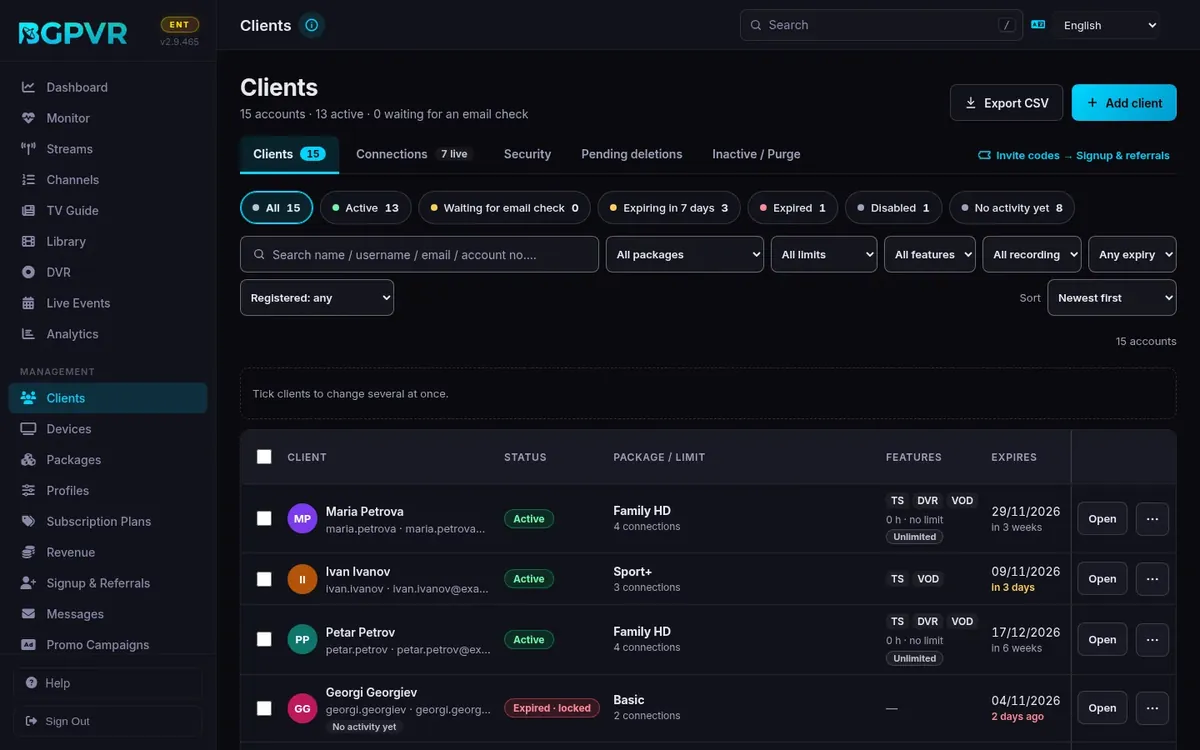
The line under the title counts the accounts ("110 accounts · 104 active · 6 waiting for an email check"). The status chips under the tabs are filters with counts: All, Active (enabled and the paid time has not run out), Waiting for email check (signed up, never confirmed the email; a Paid Plan sign-up waiting for its payment is not counted), Expiring in 7 days, Expired (the paid time ran out: locked, or on the free package; since 2.9.322 the Expires › "Expired" filter means the same: a pending, disabled, suspended or banned account is listed there only when its expiry date has passed), Disabled (disabled, suspended or banned) and No activity yet (never watched anything, never registered a device, never held a connection; computed on the server). Click a chip to narrow the list; click it again, or All, to clear it. The chips combine with the filter bar: the search box (name / username / email) and the Package, Limits, Features, Expires and "Registered" lists. Every filter in use shows above the table as a chip with ✕, next to "Clear all" and "Showing N of M accounts"; the Sort choice is kept separately. The list shows 25 accounts a page (50 or 100 under the table). "Export CSV" (admins) downloads the accounts shown now, every page, without passwords or links.
See one client at a glance (the client panel)
Click a client's name or "Open". A panel opens on the right (the whole screen on a phone). The address gets #client-<id>, so you can send the link to another console user, and the browser's Back button closes the panel. At the top: the name, the status, username · email · client number, and Edit, Access links, Security & locker and Send message. "Subscription": the package, the connections (and how many play now), the features, the expiry and the Extend buttons. "Rooms & devices": for each room, the app or box and when it was last used, what plays now (the app and its version), the app sign-ins and the registered set-top boxes; never an IP or MAC address. "Terms & privacy": the T&C acceptance (version, time, how) with "Proof" (the full record), whether a date of birth is set (never the date), the parental PIN on or off, and the adult lock while protection of minors is on. "Recent activity": the last things watched. At the bottom: "Delete client…", Disable or Enable, and "Apply invite code". Esc or ✕ closes it. Staff without "Manage Clients" see the panel without Edit, Extend, Delete or Disable.
Change many clients at once
Tick the boxes on the left (the box in the header ticks the whole page). The bar above the table then offers "Extend…" (1, 3 or 12 months), "Change package…", "Send message…" and "Disable", and "Clear selection"; each dialog lists the accounts it will change. There is no bulk delete. Each account is changed exactly as Edit would change it, under the same permission (staff need "Manage Clients"; "Send message" is open to any console login). The result says how many were changed, skipped (never expires, already on that package, already disabled, an expiry too far in the future) or failed, and names the accounts left as they were. The selection is kept across pages ("N of them on other pages") but cleared when a filter changes, so an action never reaches accounts the filters hide.
See how long someone has been a customer ("Member since")
Since 2.9.318 the list has a "Member since" column: the date the account was registered (in your portal time zone) and how long ago that was. The toolbar adds a Registered filter (any, under 6 months, 6+, 12+ or 24+ months) and a Sort list (Newest first, Oldest first, Expiring first, Name (A–Z); admins also get Birthday (soonest)). The sort is remembered for each console user and kept by Clear filter. The client window shows "Member since" with the date and how long ago that was; an admin can press "Correct" to set another date, and "Save date" stores it at once, without the button at the bottom of the window (an empty field means the registration date again). Staff see the date but cannot change it. The subscriber sees the same date in My Account.
Record a date of birth
Settings → Clients → "Date of birth" decides what customers are asked. "Optional" (the default since 2.9.319) and "Required at sign-up" ask for the full date, day, month and year, in My Account and at self sign-up (trial, free and paid; accounts made from an invite are not asked). "Off" keeps the 2.9.318 birthday: day and month only, never a year, and while the birthday present is switched off no new birthday is recorded. The day and month are for the greeting and, when it is on, the birthday present; the year is only for protecting minors (Settings → Clients → Protection of minors, which stays off until you switch it on). Before you ask for the year, make sure your privacy policy says that you collect it and why. Subscribers add, change or remove the date themselves in My Account → Account Settings → Personal details; they can change it once every 12 months, and removing it always works. The Edit window has a "Date of birth" row (Account › Personal & terms): "Not set · Record on request…" until a date is on file. An admin sees the date and changes it only when the client asked: "Change…" opens a dialog with Day, Month, Year and the required tick "The client asked for this (by phone, e-mail or in person)", and the client then gets a message that it was added at their request. Staff with "Manage Clients" can do the same on the client's request but never see the date: only "On file" or "Not set", and "🎂 Birthday today" on the day. While protection of minors is on, staff can't change the date of an account whose adult-content lock is on; an admin can. "Clear" deletes the date and its messages after a confirmation. Both save immediately, not with the window's Save.
Renew, upgrade or extend an account
Either edit the client (Subscription tab: a date, +1 / +3 / +12 months, or Never expires), or use the row's ⋯ menu → "Apply invite code": pick an unused code or paste one and it is applied as if the customer redeemed it — expiry becomes MAX(current expiry, today) + the code's duration, status is set back to active, the code's package/profile/locker mode are assigned and the code is consumed. A toast confirms "Applied — active until <date> (+N days)". The Subscription tab's status cards always show the account's current status (Expired, Waiting for email check, Waiting for payment, Marked for purge and Banned included), and Save changes the status only when you pick another one. Choosing Active for a disabled, suspended, banned or pending account whose expiry date has passed asks first: Active alone leaves it expired, so move the date too. Moving the Expiry Date of an Expired or Marked-for-purge account into the future (or ticking Never Expire) makes it active again; a Disabled, Suspended, Banned or Pending account keeps its status until you change it. An expiry date must be a real date (YYYY-MM-DD) or empty. Quicker: in the client panel, "+1 month", "+3 months" or "+12 months" extends from the later of today and the current expiry (an expired account becomes active again, as with Edit), and "Pick a date…" sets any date; the panel shows the new date at once.
Issue invite codes
Since 2.9.323 the invite codes are on Signup & Referrals → Invites (see that page: generate, copy, retire, delete, clean up). The link "Invite codes → Signup & referrals" at the end of the Clients tab bar goes there. "Apply invite code" stays here: the row's ⋯ menu, the client panel and the Edit window's Subscription tab.
Handle deletion requests and dormant accounts
"Pending Deletions" lists customers who asked to delete their account in My Account or in the app (BGPVR Player 1.8.4 and later); each account is deleted on its "Deletion date": the end of its paid period (shown under "Paid until"), or the request when nothing is paid, plus the days set in Modules → "Security" → "Account deletion: days kept" (default 14). The list shows the next deletion first; the "Deletes in" column turns amber ≤5d, red ≤2d and "Send offer" pushes a Discount %, Free Days or Message-only retention offer (expiring in 24/48/72h) into their portal and email. "Inactive / Purge": "Scan for inactive users" flags matching accounts as pending_purge; tick rows and "Purge selected" to hard-delete them (erases the client's data from every table, as Delete User does, keeping username/email/reason/purged-by in the Purged Accounts Archive); "Exempt" sets the purge-exempt flag so future scans skip the account.
Know what happens after a deletion request
The subscriber confirms with their password. Nothing is deleted straight away and nothing is refunded. On a paid plan the account keeps working until the end of its paid period ("Paid until") and is not renewed; then it is kept for the days set in Modules → "Security" → "Account deletion: days kept" (default 14), and on its "Deletion date" the hourly clean-up erases it (not while a retention offer you sent is still open) with its recordings, profiles, favourites, devices and settings (invoices are kept). With no paid period (a trial, the free package, an expired plan, an account that never paid, or one set to never expire) the days are counted from the request. Until that date the subscriber can change their mind with "Cancel deletion" in My Account or the app; automatic renewal stays off after a cancel, so they renew in My Account. While a deletion is pending, buying or renewing a plan, redeeming a code, using banked free days and claiming a gift are refused with "Cancel the account deletion first". Each request is emailed to Settings → Notifications → "Alert email" (it needs email set up on the Email tab and is sent even when "Deliver via" Email is off): client ID, username, time of the request, paid until, deletion date and the Stripe renewal result, and no other personal data. With no alert email set nothing is sent (only a log line). A request made before 2.9.325 keeps its old rule: 14 days from the request.
The Payments tab (2.9.401)
Client › Payments (admins and "See revenue"): the next renewal, paid in total per currency, every online and recorded payment, refunds as their own minus lines, cancelled entries crossed out, pending and failed tries dimmed. With "Record payments": Record a payment, Cancel payment (asked in the page) and Record a refund.
Packs on top of the package (2.9.403)
Edit a client → Subscription → Packs on top of the package: tick a pack and pick how long it runs (no date = it follows the plan; never past the plan's end), then Save packs. Packs given here are not charged: record the payment in Revenue. When a pack ends, its channels leave every app within a minute; recordings already made stay, and a one-off recording still to come on those channels is cancelled with a message to the viewer. The paid add-ons running now are listed under the packs.
Paid add-ons (2.9.403)
A paid add-on (Recording, Timeshift, Films) or extra device runs one month, or until the plan's end if that is sooner, and works even when the package does not include it. Buying it again adds a month on. At most 3 extra devices at once. Cancelling or refunding the payment takes it back. A checkout is refused before any payment when the plan has ended, the viewer is on the free package or the device limit is reached.
Packs: Follows plan and quick choices (2.9.404)
Each pack row has 1 month, 3 months, 1 year and Follows plan (No end on an account without a plan end). Follows plan, the default for a newly ticked pack, keeps no date of its own: the pack runs while the plan runs, also after a renewal, and stops when the plan ends; on our own and staff accounts without a plan end it has no end. A month or a year fills the date, never past the plan's end (the row says when the date was cut to the plan's end); a date you type still works. After Save packs the row says Follows plan, No end or Until <date>. Packs saved before 2.9.404 keep their date: clear the date and save to make one follow the plan. A viewer cannot buy a pack that already follows the plan.
Parental PINs are stored more safely (2.9.416)
The account parental PIN and the channel lock PINs are now kept in a salted one-way form, so they cannot be read back from a copy of the database. Nothing changes for viewers: a PIN set before works as before and is moved to the new form the next time it is typed correctly. The wrong-PIN lock-out is unchanged.
Enigma2 bouquets: one plain stream and the player on the box (2.9.417)
The Enigma2 bouquet now gives every channel a plain MPEG-TS address (.ts?native=1&container=ts): a DVB channel straight from the tuner with all its sound tracks, subtitles and teletext, an HLS source remuxed. Receivers away from home no longer get the adaptive HLS transcode the receiver's own player cannot play. "Player on the box" picks the player the receiver uses: Receiver's own (1, the default and recommended), GStreamer (4097), ServiceApp with GStreamer (5001) or with exteplayer3 (5002; both need the ServiceApp plugin). The subscriber sets it in My Account under Other apps; in Edit client, Streaming links, the select only changes the link you copy. The player= in a link wins over the account's choice; a link without it uses the account's choice, else 1. Bouquets already on receivers keep working as before until they are downloaded again. Radio channels are listed as radio services. If the stream link cannot be made, the download fails with a message rather than writing the password into the file.
Every guess at a channel PIN counts (2.9.417)
On a channel with its own lock PIN, a right guess now counts as an attempt too, exactly like the account PIN: it resets the wrong-PIN count, and while an address or an account is locked out every guess is refused alike. The lock-out itself is unchanged (by default 5 wrong PINs, then 15 minutes).
One box for film and series categories (2.9.418)
Edit client → Content now has one Film and series categories box instead of two lists. Follows the package is the default: every category of the package, and new ones as they arrive. Only these categories lists them to tick; new ones do not arrive on their own. Private extras lists the private categories given to this account; they are added on top of whatever is chosen above. The line at the top says how many categories, films and series the account sees. With Only these categories, nothing ticked and no private extra, Save stays off. Manage categories… opens the Categories window.
Watching syncs for every kind: Continue watching (2.9.435)
BGPVR keeps one resume point and watched mark per viewer profile for recordings, films, series episodes and catch-up programmes, shared by every device of the household: stop an episode on the phone and the TV offers to resume it; an item is marked watched at 90 % or when the viewer marks it. The apps, the web player and the server's own play logs feed it, so Xtream players and MAG boxes move the resume point too. The client window shows the account's Continue watching (what each profile left half-way, newest first); viewers see theirs in My Account → Home and can take an item off with ✕. A Kids profile's history is the parent's; family members never see each other's, and the holder never sees a member's. BGPVR Player 1.9.5 and later show the resume question, the watched ticks and the next episode for every kind; older apps keep working as before. Films and episodes can also be prepared ahead (the app asks while the viewer decides), so the first start no longer waits on "Connecting…".
Give one client their own recording hours (2.9.446)
Open the client → Edit → Subscription → Recording allowance. The box shows the hours used, split into finished, recording now and scheduled, and who shares them. Leave This client's hours empty to use the package's number, type a number to give this client their own, or tick Unlimited for this client. A number below what the client has used is allowed: the page warns you, nothing is deleted, and new recordings are refused until they are under it. The Clients list shows usage under the DVR badge, and the Recording filter finds who is near full, full or unlimited.
Find an account by its number (2.9.451)
Type the account number in the Clients search box, as 1234 or #1234: that account is listed first; for 1234 without # the names, usernames and e-mails that contain those digits follow it. The same works in every console search that finds clients: Record a payment, a package's Clients tab, Give to an account or package in a private category, the STB stock list and its customer search, Support ("#1234" also finds report 1234), New message and the Messages list, Devices, Monitor and the clients' recording rules.
Who signed a TV into a Kids profile (2.9.451)
Open the client → Activity. A TV signed in with a code shows as "A TV sign-in code was approved". When the code put the TV in a Kids profile, the line says who approved it (admins; staff logins see the line without it): the account holder, or the family member by their profile name. Nothing else about the member is kept in the line.
The Family tab and places (2.9.470)
The client window has its own Family tab now (it was a block on the Devices tab), shown while Modules → Family members is on. It lists everyone at home: the account holder first (You · holder), then each person in their order, with Co-parent or Child where it applies, a key on everyone who uses a place, their own-sign-in status, devices and when they last watched, never what they watched. One line says how many places are used ("4 of 5 places used"); while the account has no family sign-ins it says why instead. The member actions are the same as before: Resend, Cancel invite, Send reset link, Pause, Resume and Remove, only with Manage clients. A key marks the holder, each person with their own sign-in (an invite still waiting or expired counts until it is cancelled) and each child. The rules from 2.9.470: at most 6 people (the holder + 5); an account that already has 7 keeps them but cannot add more. Places are never above 6: the package's "Family members (own sign-ins)" still includes up to 5, and extra members stop at 6. family_extra_members_max (3 by default) is now also capped by 6 − included, so a plan with 5 included can have only one extra member. An extra member adds a place, never a person: My Account offers it only when every place is used and an adult in the family has no own sign-in yet, and billing refuses one that would not add a usable place. Extras already bought above the cap run to their end date and are not sold again. Viewers set up a TV for someone in My Account → Family or Devices → Activate a TV ("Who is this device for?"): the holder for anyone, a co-parent only for the children, an adult with an own sign-in only for themselves. From BGPVR Player 1.9.8 the holder's or a co-parent's phone can also sign in a TV on the same Wi-Fi after both screens show the same 4 digits. Apps before 1.9.8 still say Profiles.
Family members in the Clients list (2.9.472)
While Modules → Family members is on, a client with family members shows a "Family · N" button under its name in the Clients list (N = the holder + everyone else at home). Press it to open the people right under the client, press again to close it; families are closed when the page opens. Each person shows their picture or initials, name, Co-parent, Adult or Child, their own-sign-in status (Active, Invited, Invite expired, Paused, or No own sign-in), the place they use ("Place 2 of 5", "Uses no place"; nothing while the account has no family sign-ins), how many devices they signed in and when they last watched, never what they watched. "Family tab" opens that client on its Family tab with the person marked. Members are not clients: they have no row, checkbox or package of their own, and the package, expiry, payment and licence count stay on the account; the header's "· N people" (clients + their family members) is information only. Search also finds a family member by name or e-mail: the holder is shown with the family open, the person marked "Match", and a line says "Found among family members: … — on …'s account." The new Family filter shows the clients that have family members, or only those where someone has their own sign-in; it appears in Filters: and Clear all removes it. Staff see the same as the Family tab: name, e-mail, role, status, devices and when they last watched.
Join a family (2.9.473)
A holder can ask someone who already has their own account to join the family (in My Account an invite to that e-mail says "This e-mail already has its own account" and offers "Ask them to join"). Only that person can accept, signed in to their own My Account. In the Family tab the person shows "Asked to join" with "from account #N" until they answer (it holds a place like an invite: Resend asks again, Cancel invite frees the place), then "Joined from account #N" or "Declined" (Remove clears it). The same shows in the Clients list under the holder. "Move into a family" (at the bottom of a client's Family tab, Manage clients) sends that client the same question for the holder account number you type: nothing changes until they accept. When they accept, their name, picture, favourites, history, the recordings that fit the family's hours and their app devices go with them, their Stripe renewal is set to stop at the end of the paid period, and their own account shows "This account joined the family of account #N" and closes (Disabled, kept, never purged) when its paid time ends; until then it is still counted as an active account. If they leave the family (or the holder removes them), their own account comes back, enabled, with their favourites, history, recordings and devices; its plan is whatever its date says (add time by hand if you agree to). Their MAG / M3U / own username sign-ins keep working on their own plan until it closes.
Who pays for what, and gifts (2.9.474)
A co-parent or an adult family member (active, with their own sign-in) can add a pack or a feature add-on (Recordings, Time-shift, Films) for the whole family from their own My Account page, with their own card through Stripe: a part of a month today up to the family's renewal date, then monthly. The pack stays on the holder's account; the holder is never charged for it, sees "Paid by <name>" and can stop it renewing (it stays on until its paid date; the payer gets an e-mail). Only the holder can add 18+ packs, and plan changes and extra places stay the holder's. When the payer leaves the family, their renewal stops at the end of its paid time. The holder or a member can also make a gift link for a pack (never 18+): anyone opens it, types a name and an invoice e-mail and pays once for 1, 3 or 12 months (no account is made, nothing of the family's account is shown). The holder can decline a gift within 14 days and the giver is refunded through Stripe. In a client's Family tab, "Who pays for what" lists the members' payments and "Gifts" the gifts; Refund (Record payments) refunds a paid gift through Stripe. The Payments tab shows who paid ("Paid by <name> (family member)" or "Gift from <name>") and the card's brand and last 4 digits (nothing else of a card is kept). Recordings left in a joined person's closed own account are deleted 30 days after it closes; when staff switch a holder off, a joined member can still sign in only to leave the family.
Password resets sign the apps out (2.9.490)
Resetting a viewer's password (the e-mailed code, or Reset password here) now also gives the account a new token and signs its apps out, so an old password or a copied link stops working everywhere; family members keep their own devices. My Account passwords need at least 8 characters when set or changed. Apps, Web TV pairing and player addresses that try many wrong passwords are paused (10 a minute per address, 20 in 15 minutes per username), like the Xtream sign-in. A MAG box the suite does not let in always sees the same screen ("This device can't sign in"), and an address that tries many unknown MAC addresses is paused (boxes on your own network never are).
Play on TV in BGPVR Player (app 1.9.8)
Nothing to set up. From app 1.9.8 a viewer watching on an Android phone or tablet can tap Play on TV in the player's top bar: BGPVR Player on their Android TV, Google TV or Fire TV at home starts the same live channel, catch-up programme, recording, film or episode at the same place; films, episodes and recordings keep the sound language and subtitles where the TV has them, and live channels do from app 1.9.10. A sleeping Google TV or Fire TV is switched on first where it can be. The phone becomes the remote: Play here brings it back, Move to another device sends it on. It uses the phone remote's pairing (a 6-digit code on the TV, once) and works only between a phone and a TV on the same account and the same home network. The TV plays from its own sign-in, so the TV's own profile (a Kids profile too), PIN, adult and package rules apply, and your server sees an ordinary playback from the TV. The phone lets go of its stream as soon as the TV starts, so the account uses one stream; the resume point is saved as usual, so Continue watching stays right. Only ids, the place and language choices go from the phone to the TV, encrypted, inside the home network. No new setting, port or address on the server. iPhone and iPad come later.
Move to another device in BGPVR Player (app 1.9.9, renamed in 1.9.10)
Nothing to set up. From app 1.9.9 a viewer with two TVs at home (Android TV, Google TV or Fire TV) can move what plays from one to the other: Move to another device in the TV player (the player bar for films, episodes, recordings and catch-up; More on a live channel), shown only when another TV on the same account answers on the home network or is asleep and wakeable from this TV, or Move to another device on the phone remote. The other TV opens the same item paused at the same second, in the same profile, with the same sound and subtitle languages (live, catch-up, recordings, films and series, with app 1.9.10 on both TVs), and the first TV goes to sleep with "Moved to Bedroom". A live channel arrives paused at the same moment when it can time-shift on the other TV, otherwise it plays live. Both TVs need app 1.9.9 (and the phone, to move from its remote), Control from phones on (Settings › Connected phones), the same account and the same home network. The first move between two TVs asks for OK on the other TV, once in each direction. Kids and PIN rules stay on the TV that plays: a Kids profile arrives as Kids, moving from an adult profile to a TV last used by a child asks for the parental PIN, a PIN channel asks for its PIN there. The moving TV can switch on a sleeping Fire TV; a sleeping Google TV is listed only when the move starts on another Google TV. From app 1.9.11 the TV that was moved from switches itself off a few seconds later, and does the same when its sleep timer ends, once the viewer has allowed it on that TV (Settings › TV power › Allow this TV to switch itself off: the TV shows a code, typed on the TV or from the phone remote; BGPVR sends only Sleep, to the TV box's own remote service on that TV). Without that, and always on a Fire TV (an app cannot switch it off), the TV goes to sleep by its own timer and says so. Only ids, the place and language choices go from TV to TV, encrypted, inside the home network; each TV plays from its own sign-in. No new setting, port or address on the server.
Switch the TV off and on from the phone (app 1.9.8)
Nothing to set up. From app 1.9.8, ⏻ on the phone remote stops BGPVR on the TV and puts it to sleep. A Google TV or Android TV box switches off for real after the viewer pairs the phone with it once: the phone offers "Switch the TV off from this phone", the TV shows a 6-character code and the viewer types it on the phone (this is the TV box's own remote pairing; the phone keeps its key, and "Forget TV pairing" in the remote's settings deletes it). After that ⏻ puts the box to standby and HDMI-CEC switches the TV off; "Turn on" wakes it through the box's own standby wake, and BGPVR opens. A Fire TV can't be switched off by an app: its screen goes dark, the phone says so, and the Fire TV sleeps after its own timer (it switches the TV off when HDMI CEC Device Control is on). The subscriber help (Play on TV) explains it with the app's words. Nothing changes on the server.
Sound and subtitles in BGPVR Player (app 1.9.10)
Nothing to set up on the server. From app 1.9.10 BGPVR Player remembers, for each channel, the sound language and subtitles (or Off) the viewer picked there and uses them the next time. The order is: the choice a moved stream brings with it, then the channel's own, then the account's default (Sound language and Subtitles in the App tab). Subtitles on channels with several languages (Live+ channels, server 2.9.497 or later) now also show in the iPhone, iPad and Linux apps and with the mpv player engine on Android. Limit: with the native mpv surface (Android TV older than 10, or chosen in Settings) the subtitles stay burned into the picture and the menu has no subtitle rows.
Watch out
- Changing the Package on an EXPIRED account does nothing on its own — entitlement is date-driven, so the account stays on the free package until the expiry date is in the future. The Edit window asks first ("The subscription is still expired", Save anyway) but still lets you save the no-op.
- The Edit window always shows the STORED subscription, not what the account is currently running on. A lapsed account says "Subscription expired on <date>" at the top and the list row shows the free package with "was <old package>" underneath. Both are correct — they are different things. Since 2.9.322 "expired" means only that the paid time ran out: a pending trial whose date is two days ahead says "The trial starts when the email address is confirmed", not "Expired … access locked".
- Live TV is the only flag where the package is a hard ceiling (server-side: package AND client). Timeshift / DVR / VOD are NOT consistent: the XC/app listings and the MAG/Stalker paths require package AND client, but the app's DVR/Catch-up access endpoint takes the client's own flag whenever it is set (which the admin form always sets). To remove DVR or VOD from one subscriber, untick it on the CLIENT — unticking it only on the package does not reliably remove it everywhere.
- "Max Connections" on the client is the only per-subscriber cap enforced at playback; the package's Connection Cap is not consulted at play time. Confusingly, the Limits column may display the package's cap for an account that has lapsed onto the free package — playback still enforces the client's own number. Max Connections limits live streams only: recordings never count, and films and series do not count by default (see Connections).
- "Delete client…" is immediate and has no undo. It erases the person's data everywhere (devices, sessions, viewing history, security and device logs); only invoices and the purge record are kept. A rented or provided box stays in STB Devices — only its link to the customer goes. Purge is also permanent; only the archive record survives.
- "Reset streaming links" (Edit › Streaming links, or Access Links) replaces the token inside every link — the M3U link and the Xtream playlist, XMLTV and Enigma2 bouquet links in the console and on the subscriber's account page — and drops active streams. Every copy stops working. The username and password do not change: apps signed in with them pick up the new link on their next refresh, but link-only players and Enigma2 bouquets must be re-added by hand. Operator resets are recorded in the client's security events. Changing a subscriber's password also resets their Xtream, XMLTV and Enigma2 links (not the M3U link — use Reset streaming links for that).
- Since 2.9.322 the console's links come from the server with the client's key, never the password: the Edit window's Streaming links tab and the Enigma2 bouquet in Access Links (admins only; staff see that they exist, not the link). Xtream "Copy all" copies the server, port, username and — for an admin — the password: those are sign-in details, not a link, so a reset does not change them. Kodi (HTSP) is unaffected by a reset.
- Licence caps bite here: max users is 10 on Free, 100 on Pro, 500 on Business, effectively unlimited on Enterprise. Past the cap "Add client" is refused with "<Tier> tier allows N users", and so are self-signup and invite-based signup.
- Registering a SECOND device MAC on a subscriber is refused below the Business tier (403 multi_stb_not_licensed), both in this form and in the customer's own portal. The admin toast shows the raw code "multi_stb_not_licensed" rather than a friendly message.
- Staff (non-admin) accounts never see the password, cannot type a new one, and do not get the links that carry the client's key (M3U, the TV guide with the key, the Enigma2 bouquet).
- Locker Mode "Strict" denies only when the request actually carries a MAC and the account has at least one registered MAC that does not match — an account with no registered device is not blocked by it. Below the Business tier only the trusted-source/slot learning is skipped; Allowed IPs, the Strict MAC check, security blocks and the connection limit are still enforced on every tier.
- Each box's time zone and weather town belong to the subscriber: they set them on their account page under STB Devices (with a town search), or on the box itself (Settings → Device → Time zone). The console has no field for either. The fleet default time zone is the portal_timezone setting (Europe/Sofia) and a fleet-wide weather town is the weather_city setting; both can be changed only through the settings API. Since 2.9.314 the BGPVR Player app (1.7.7 and later) shows the same kind of town next to the temperature on its home screen: the device's town, else the subscriber's, else weather_city, else one found from the IP address, as on MAG boxes; the server sends the town only to signed-in subscribers.
- The Xtream Codes "Port" field is filled from the browser URL and shows 80 whenever the console is reached on a default port — including HTTPS, where the correct value is 443. Check it before pasting into a player.
- "Scan for inactive users" flags expired or disabled accounts with no activity for 90 days and no paid invoice in the last year, skipping purge-exempt accounts and those already requesting deletion. Flagging sets pending_purge, which blocks playback, so review the list before pressing "Purge selected". Ticking "Exempt" on a row that is already flagged does not take it off the list: "Purge selected" still deletes it.
- Stripe renewals are not stopped by this server yet: it does not store Stripe subscription ids, so a deletion request cannot cancel one. When the customer has paid through Stripe, the email says "check the Stripe dashboard and cancel any automatic renewal by hand": do that in the Stripe dashboard (cancel at the end of the period, no refund). Only a plan with a Stripe price id renews by itself; a one-off card payment never does.
- After five wrong passwords in 15 minutes (the deletion request and the password change in My Account count together), further tries are refused with "Too many attempts" for up to 15 minutes, for that account only. The parental PIN has the same guard in the app, the web player and My Account, whether protection of minors is on or off (2.9.338): after five wrong PINs in 15 minutes the PIN is locked for 15 minutes for that account (the right PIN is refused too). A MAG box's own PIN is separate and does not count here. With protection of minors on, a third lock-out within 24 hours lasts 24 hours, and one address may try at most 20 PINs per 15 minutes.
- Subscribers keep their own list of rooms in My Account → Profile → Devices → "Rooms at home": 10 ready-made rooms plus names of their own, up to 20 rooms of up to 24 characters. The BGPVR Player app (1.8.3 and later) picks each TV's or tablet's room from that list, and the console's now-watching lines show the room's name. Older apps show the device type for a room they don't know.
- Customers who ask which Fire TV to buy: send them to the help on your server, /help#fire-tv (on the demo server: pvr.bgpvr.com/help#fire-tv; the FAQ answers it too, under "Which Fire TV should I buy?"). In short: a Fire TV Stick 4K Max or 4K Plus, a Fire TV Cube or a TV with Fire TV built in. "Select" models and the 2026 Fire TV Stick HD and 4K run Vega OS, and BGPVR cannot be installed on them.
- Bulk changes (and the panel's +1 / +3 / +12 months) are kept in their own log, not in the Security tab: who changed which account, what and when, kept for 400 days (Backup → Database maintenance, "Client changes made in bulk"). A bulk message is saved for every account at once and the push notifications go out right after, in the background. If the console says the message may have been partly sent, check Messages before sending it again.
- An expiry set by hand far in the future (such as 31/12/9999 used as "never") cannot be extended: Extend skips it as "too far in the future". Leave the date empty (or tick Never Expire) for an account that should never expire.
- Since 2.9.321 an older confirmation email (its link works for 48 hours) activates only an account that is still waiting for it. A trial you disabled stays disabled if the customer clicks an older link, and a second link never starts the trial again; the email address is still marked as confirmed.
- Enable in the client panel sets the account to Active. For a sign-up that never confirmed its email, or a Paid Plan sign-up that never paid, the dialog warns first: enabling it lets the customer watch without that check.
- Notes (2.9.322): the first line a self sign-up, an invite or a referral writes ("Trial signup <date> ip=…", "Free signup …", "Paid signup <date> plan=N ip=…", "Created via invite …", "Referred by <user> (<code>)") stays in the notes, because the server reads it (the trial limits, "waiting for payment", rewards), but the Edit window shows it apart as "How they joined", read-only, with its IP for admins only (staff never get a sign-up IP, on any line). Your notes are edited under it and no save can change or fake it. Only the exact line the server writes counts: "Referred by Ivan from the shop" is an ordinary note. Notes cannot START with such a line where there is none — the save is refused with that reason; put another word first. An admin can "Remove this record…" (Notes tab): the account is then treated like one added in the console, and the removal is listed under "Changes to this account".
- "Changes to this account" (Edit › Notes) lists bulk changes, the panel's +1 / +3 / +12 months and a removed sign-up record. Edits saved in the Edit window itself are not logged.
- Since 2.9.322 the "1 trial per IP address" limit also counts a trial that has staff notes under its sign-up line (before, a note hid it). After the update some addresses that could take another trial are refused, as intended.
- App sign-ins are signed out by their entry in the list: since 2.9.322 the console never receives an app's own key (with it, anyone could have read the subscriber's password).
- Since 2.9.344 the TV guide (XMLTV) link is
/xmltv.php?token=<the M3U link's token>, with no username or password in it: My Account, Access links and the M3U playlist's own guide address all give this form, and "Reset streaming links" stops it together with the M3U link. Guide links with the username and the password or the stream key, already in players, keep working. - The client's Security tab may list
client_signin_code_createdandclient_signin_code_redeemed(2.9.344): My Account made a one-time sign-in code for the app's QR, and an app signed in with it (BGPVR Player 1.8.6 and later). A code works once, for 5 minutes, and dies with a password change, a link reset or a switch-off; the app then shows in the client's app sign-ins like any other. - The client's Security tab may list
client_app_signout(2.9.345): an app was signed out: by the viewer in the app (BGPVR Player 1.8.6 and later) or in My Account → Devices, or from the console's "Apps signed in". That device leaves the client's app sign-ins and gets no more notifications. The app's own Sign out also ends the My Account sessions that app opened on that device. The account, its password, its links and its other devices are not touched. - BGPVR App settings (2.9.377): in My Account › BGPVR App a subscriber sets, once for every BGPVR Player signed in to the account: picture quality (Full or Light (720p): the same stream-profile preference the app's Settings › Stream quality writes; a profile you force in the client's edit window wins and the page shows it as set by the provider), sound and subtitle language, the loading animation, when "Are you still watching?" asks (2, 3, 4, 6 or 8 h, or your setting in Settings; when you switch the prompt off it stays off and the page hides the choice), crash and playback-error reports, and personalised promotions (off until the subscriber turns it on; promotions are not chosen from viewing today). A change in the app changes the page too; the last change wins. Quality and "Are you still watching?" work at once on every app and the web TV (the MAG portal follows the hours too); the other settings reach BGPVR Player with its next updates (they are saved now). The settings go with the account when it is deleted.
- Recordings only (2.9.380): the BGPVR App page and the App tab no longer set the live stream profile. "Light (720p)" became "Recordings picture": it only chooses the app's lighter copy of recordings; live TV always plays as the channel sends it, so no viewer can make the server re-encode live channels. Accounts that picked another stream profile in the app's own Settings › Stream quality keep it, and a profile you force in the client window works as before.